Google will invest $10 billion in Anthropic PBC, with another $30 billion potentially to follow, strengthening the relationship between two companies that are at once partners and rivals in the race to build artificial intelligence.
Google will invest $10 billion in Anthropic PBC, with another $30 billion potentially to follow, strengthening the relationship between two companies that are at once partners and rivals in the race to build artificial intelligence.
Anthropic said that Google is committing to invest $10 billion now in cash at a $350 billion valuation, the same amount it was valued at in a funding round in February, not including the recent money raised. The Alphabet Inc.-owned company will invest another $30 billion if Anthropic hits performance targets, the startup said Friday, and support a significant expansion of Anthropic’s computing capacity.
One of the major advantages of B-72 as a consolidant is that it is stronger and harder than polyvinyl acetate without being extremely brittle. This adhesive is more flexible than many of the other typically used adhesives and tolerates more stress and strain on a join than most others. The major drawbacks to using B-72 are related to its handling properties: as in the case of other acrylic resins it is difficult to apply as an adhesive and to manipulate with precision.[6]
The most suitable solvent for B-72 is acetone. However, solvent mixtures with various proportions of acetone, ethanol, and toluene are frequently used to alter the working time of the resin and to produce slightly different properties (hardness and flexibility, e.g.) in the set resin. Unlike cellulose nitrate, B-72 does not need additives like plasticizers to stabilize its durability. Fumed colloidal silica can be added to help with the workability of the resin. Research shows that the silica better distributes the stress and strain that occurs during evaporation of a solvent and during the setting of the adhesive film.[6]: p.9
Because of its transparency and versatility, conservators, led by Stephen Koob of the Corning Museum of Glass, have recently begun to use cast sheets of B-72 as a fill material in glass objects.[7]
^Phenix, A. 1992. Solvents for Paraloid B-72. Conservation News 48:21–3.
^ abKoob, Stephen (30 April 1986). "The Use of Paraloid B-72 as an adhesive. Its application for archaeological ceramics and other materials". Studies in Conservation. 31: 7–14. doi:10.1179/sic.1986.31.1.7.
On a misty morning in December, two photographers captured the images of 304 individual humpbacks – the highest number of large whales ever identified in a single day.
Katherine Latham
ChrisFallows.com
(Credit: ChrisFallows.com)
When you have 200 humpback whales or so close to each other, says Monique Fallows, their blows appear "like a Manhattan skyscraper skyline".
Humpbacks dive to feed then resurface for air. Bursting from their enormous lungs at over 300mph (483km/h), a humpback whale's blow can rise up to 7m (23ft) into the air. "The sound is like a big bellows," says Monique, a nature photographer and author, who has documented humpback super-groups multiple times.
The smell is also strong for anyone nearby. "You feel the breath of the whales falling on you," says Monique. "The whales burp and fart all the time – on a ginormous scale. The smell is pungent. It's very fishy."
Over two days in December 2025, Monique and her husband, fine art photographer Chris Fallows, photographed several different humpback "super-groups" off the west coast of South Africa. The couple captured 208 individual humpback whales on the 29 December, and a whopping 304 the following day. That, says Chris, is the greatest number of large whales ever identified in one day in our planet's history.
"This truly is a testament to their recovery," says Chris.
Intense industrial whaling during the 20th Century virtually wiped humpbacks out, leaving less than 5% of pre-whaling numbers in the ocean. But 40 years ago, a global whaling moratorium came into force and populations began to recover.
Experts aren't yet sure why we're seeing this sudden surge in these gatherings. It could be a change in prey availability, or an increase in the numbers of whales elsewhere prompting exploration of new feeding strategies or areas. Or perhaps this is something they've always done, but only now are we witnessing it as populations recover.
Being surrounded by such a huge number of inconceivably large animals is "a complete sensory overload", says Monique. "They're exhaling all the time. When you first smell it, you're like 'Oh, God, what is that?'"
You can see the moment Monique and Chris Fallows met a super-group of humpbacks in the video below.
Humpbacks usually only come together in small groups to feed or mate, spending much of their lives in solitude. During the austral summer months, however, upwelling of cold, nutrient-rich water from the deep ocean leads to enormous blooms of phytoplankton and the whales' favourite meal of euphausiids – or krill – follows. That's when super-groups now come to feed.
Humpback whales live in all the world's oceans. Each year, they make some of the most epic migrations of any mammal on the planet, as far as 5,000 miles (8,000km), from the warm waters of their breeding grounds to colder water where they feed. In the process they transport huge amounts of nutrients across the globe, which plays a vital role in the health of marine ecosystems.
As we got closer those breaches sounded like huge bombs going off as the 40-plus tonne whales leapt out and then crashed into the ocean – Chris Fallows
The recovery of humpbacks is "really the conservation success story", says Simon Elwen, a marine biologist at the University of Stellenbosch, South Africa. "It is phenomenal."
In just five years, from 2015 to 2020, humpback super-group sightings off South Africa's west coast soared from 10 to 65 per year.
When Elwen's team was doing surveys in the early 2000s, "we were so excited to see one or two whales", he says. Today, seeing a single whale during the summer months is no longer a novelty – it is not seeing multiple whales that is rare. "Seeing groups of hundreds of whales in a day is perfectly normal these days – because we've had that exponential growth," says Elwen. "It still catches us by surprise sometimes."
ChrisFallows.com
"It's like a Manhattan skyscraper skyline of all the blows," says photographer Monique Fallows (Credit: ChrisFallows.com)
Elwen likens the humpback population explosion to the spread of a virus. "You have the very long, slow period of not much happening, but there is growth and then it eventually goes 'whoop!' and increases rapidly."
It was on the brink of New Year when Monique and Chris, together with their three dogs, slept in sheltered anchorage on the deck of their small boat in the hopes of photographing a super-group. They had heard from whale watching companies in the area that whales were gathering, and their aim was to photograph as many as possible of them and then submit their images to Happywhale, a citizen science project that aims to photo-ID marine mammals globally.
The couple awoke at 03:45, before sunrise, in pursuit of the best possible lighting for their subjects. Then, in the mist of early morning, they set off.
They moved slowly, turning the boat's engine off every few minutes to "simply drift and listen", says Chris. "When the whales breach you can hear them from miles away, so we would head in that direction. As we got closer those breaches sounded like huge bombs going off as the 40-plus tonne whales leapt out and then crashed into the ocean."
It's so chaotic, and so crazy. There are whales everywhere – Ted Cheeseman
Next came the smell of the whales' breath drifting on the sea breeze. Then the sound of deep exhalation. "We heard the breathing of over a hundred whales," says Chris, "followed by the visual confirmation of flukes, flippers and bodies."
Now, the game was on.
Chris was concentrating on capturing beautiful fine art photography, although both he and Monique had fun competing to see who could take the most identification shots.
ChrisFallows.com
Monique and Chris Fallows competed to see who could take the most identification shots (Credit: ChrisFallows.com)
"We didn't go out with the intention of breaking a record," says Chris. "There were just so many whales around us. Monique and I were laughing, because there was just so much going on that you didn't even know what to photograph. It was like rapid fire."
The 512 whales they photographed over two days contained some duplicates, bringing the total number of individual animals identified over the course of their trip to 372.
This was a "phenomenal number of whales", says Ted Cheeseman, a marine conservationist who founded Happywhale in 2015. Of those 372, only a handful had been previously photographed, he adds, and only in the past few years.
"We don't know the age of the whales. We use their sighting history as a proxy for age," says Cheeseman, "but I think the great majority of those whales are under 10 years old – I say that with great confidence – and a high percentage may be under five years old.
"These are new whales. This is a population rebounding."
Humpback mayhem
Imagine hundreds of 10-tonne toddlers all trying to fetch themselves a snack, all at the same time. That's what these super-groups resemble, says Cheeseman. "It's so chaotic, and so crazy. There are whales everywhere."
Happywhale lets members of the public upload their images of whale tail flukes or dorsal fins. Then, using advanced AI image recognition, the project identifies individual animals. It now hosts a collection of almost 1.5 million photographs, allowing scientists to track the health and population status of species and observe migration patterns across oceans.
ChrisFallows.com
Chris and Monique Fallows broke the record for photographing the most whales in one day (Credit: ChrisFallows.com)
Usually, humpbacks hunt in a highly sophisticated, social way. Take "bubble net feeding", for example. This is where humpbacks blow bubble nets around fish to trap them in a small space. The whales appear to coordinate their movements using complex communication. "If you could hear what's going on underwater while they're feeding – I mean, it makes my skin tingle. You can literally hear the whale say, 'Okay, it's time. Go.' And then all the whales come up together." (Watch whales bubble net feed and listen to them chat on BBC Reel.)
During super-group aggregations, however, "there are so many fish, and whales are going everywhere", says Cheeseman. "It's just mayhem."
The age profile of the group adds to the apparent chaos. "Younger animals don't necessarily have the same physiological capacity as adult animals," says Jennifer Jackson, a marine ecologist at the British Antarctic Survey, the UK's polar research institute. Plus, the chosen hunting technique will depend on what prey they're chasing, as well as ocean conditions and the depth at which they are hunting.
"Humpbacks are an incredibly adaptable species," says Jackson. "They can even prey switch and feed on different things, depending on what's around."
ChrisFallows.com
"These are new whales. This is a population rebounding," says Ted Cheeseman (Credit: ChrisFallows.com)
When their prey is near to the surface of the water, humpbacks will often engage in intense lunge feeding. This is where the whale propels itself at speed through a concentrated ball of krill or fish, scooping them up in its cavernous mouth. If it lunges vertically, the whale's head will rise straight up out of the water.
This is the hunting technique Elwen observed when studying South Africa's humpback super-groups in 2015. After breaching the surface of the water, rising upwards at near vertical angles, the whales often surfaced with their mouths still full of water.
"We had a group the other day of 100-plus animals," says Elwen. "They were very vocal, making a constant array of sounds." So, Elwen suggests what may appear as chaos is, in fact, "controlled chaos". "They know exactly what they're doing," he says.
ChrisFallows.com
The marks on a humpback's tail can tell the story of its life (Credit: ChrisFallows.com)
Chris and Monique have spent over three decades exploring the ocean and say they have seen "seismic changes". Now, Chris says, they are already planning their next visit "to the most incredible whale gathering on the planet".
--
For essential climate news and hopeful developments to your inbox, sign up to the Future Earth newsletter, while The Essential List delivers a handpicked selection of features and insights twice a week.
For more science, technology, environment and health stories from the BBC, follow us on Facebook and Instagram.
I bought a Rodecaster Duo to solve some audio woes, and found that it has ssh enabled by default. I captured the firmware update process and created custom firmware to enable password authentication for ssh.
last year i bought a Rodecaster Duo to solve some audio woes to allow myself and my girlfriend to have microphones to our respective computers when gaming together and talking on discord in the same room without any echo, and to be able to swap that to my work pc easily. the rodecaster is really nice, it's pretty effortless to use and works great for our home. I would gladly recommend it to anyone looking for a similar solution.
as is usual for any device in my house, i try to ensure when it's time to update the firmware I have enough tooling in place to capture how firmware updates work, or to at a minimum capture a firmware blob to try and reverse engineer it and poke around for fun and/or to see the often horrific reality that is the industry we work in.
fw update
I was feeling pretty lazy and assumed that rode would dump the firmware somewhere on my computer before flashing the device, so i set up Instruments on macos to capture disk activity, and found where the fw was dumped, and surprisingly it was just a gzipped tarball. The device I did this update on happened to have the ability to write to USB disks disabled, so the update actually failed.
Poking around a bit, i found the binaries of the stuff that actually runs on the device, as well as a shell script that handles the updates themselves. there are two partitions on the disk, so that if you brick one it boots from the other. It also doesn't have any signature checks or anything on the incoming firmware. I'm used to many vendors of this style of device requiring signed firmwares or something nowadays, kind of nice to actually own a device I can modify. I also noticed that ssh seemed to be enabled by default, and plugged in an ethernet cable and saw that ssh indeed is enabled w/ pubkey auth only. Here are the keys that are added by default:
since our update failed, i swapped to a windows pc and set up wireshark with USBPcap and then ran the update thru the rodecaster app. I roughly glanced at the pcap file and looked at where the update started, since it was a lot of traffic as I was also using it for audio on another computer. I wrote down the packet numbers I thought were interesting and threw them to claude code to dig thru the pcap while I was doing other stuff.
A bit later (cc only took 10 minutes or so but I was busy for a while) I came back to a breakdown of the structure, and a python script to manually update a device. The RODECaster App sends some HID control stuff to the device, one command to enter the update mode (the 'M' command), and then another (the U command) to trigger the update. Both are just single ASCII characters sent over HID report 1.
I am but a yaml-writing slave and sometimes a below-average ghidra user, and don't often interact with hardware devices, so getting some help from CC in discovery was useful, as well as pointing me to resources to actually learn more about hid devices.
The structure was pretty simple, you send the m command, and then copy archive.tar.gz and archive.md5 (obviously just with md5sum of the archive) onto the newly exposed disk. then you send the U command to trigger the flashing itself.
so the flow is:
plug in the rodecaster and power it on (or vice versa)
send the 'M' command
mount the disk and copy archive.tar.gz and archive.md5 to it
chmod 777 both of them because i dont care to figure out how to do it properly
unmount the disk
send the 'U' command
wait for the thing to reboot into your new firmware
custom firmware
I was still working from my mac, and wanted to create some cfw to be able to ssh into the device, so i just used a container to enable password authentication for ssh (don't shoot me) as well as add my own pubkey to the authorized keys, and dump out an archive for me to flash. you don't really need much to actually flash the device, see here (example of the functions its not really much to add the rest.)
run your script to flash the thing and bingo bongo you can ssh to it
conclusion
I was really surprised that I could actually flash firmware so easily to this, and it is really nice to own a device. It's a really nice piece of kit and just kinda blends into the background and I never have to think about it. I don't really know why ssh was enabled, or why it had this key added by default, but I submitted a ticket to RODE for this as I could not find an obvious security email to report to. I did not hear back, but I will watch to see if future firmware updates change anything.
It's been a few months since i've done anything with this, and I am trying to just dump out my thoughts into a notepad and only very lightly edit it and then just poast. I really love all of the RODE stuff I have, and yet again just want to buy more gear.
if you want to ask me questions about this or have any questions, you can reach me with the primary letter of this domain, at this domain.
A papyrus fragment of Homer’s epic The Iliad has been discovered inside the wrappings of Roman-era mummy. The mummy was found in a necropolis the ancient site of Oxyrhynchus (modern-day El-Bahnasa) in Egypt’s Minya Governorate. Archaeologists were able to remove the papyrus and identify the text as the “Index of Ships,” a description of the Greek forces arrayed against Troy from Book 2 of the Iliad.
A papyrus fragment of Homer’s epic The Iliad has been discovered inside the wrappings of Roman-era mummy. The mummy was found in a necropolis the ancient site of Oxyrhynchus (modern-day El-Bahnasa) in Egypt’s Minya Governorate. Archaeologists were able to remove the papyrus and identify the text as the “Index of Ships,” a description of the Greek forces arrayed against Troy from Book 2 of the Iliad.
A joint Spanish-Egyptian team from the University of Barcelona and the Institute of the Ancient Near East unearthed a number of mummies from the Roman-era necropolis, some in wooden coffins, some wrapped in bandages decorated with geometric patterns, three with gold tongues and one with a copper tongue placed inside their mouths. A few of the deceased had traces of gold leaf that had been applied to them after mummification.
Additional gold and copper tongues were found in the excavation of tomb number 65. Deteriorated mummified remains were unearthed in a hypogeum (underground chamber) of the tomb, revealing the tongue inserts. There were also several painted wooden coffins, but they too are poorly preserved as a result of the tomb have been looted in antiquity.
There were also finds in the older section of the cemetery.
Professor Mohamed Abdel-Badi, Head of the Egyptian Antiquities Sector at the Supreme Council of Antiquities, explained that excavations east of Ptolemaic Tomb No. 67 revealed a trench containing three limestone burial chambers.
These chambers housed the cremated remains of adults and an infant, as well as animal remains, notably cats, wrapped in cloth.
The team also discovered a collection of small terracotta and bronze statues, including representations of the god Harpocrates and a figure of Cupid. […]
For his part, Hisham el-Leithy, Secretary-General of the Supreme Council of Antiquities, added that the site offers valuable insights into burial traditions in Bahnasa during the Greek and Roman eras.
I’ll be attending Babashka Conf on May 8 and Dutch Clojure Days on May 9.
If you’re attending either (or just visiting Amsterdam), drop me a line!
When I have an idea for a project, it tends to go in one of these two directions:
I just do it. Maybe I make a few minor revisions, but often it turns out exactly how I’d imagined and I’m happy.
I think, “I should look for prior art”. There’s a lot of prior art, dealing with a much broader scope than I’d originally imagined. I start to wonder if I should incorporate that scope. Or perhaps try to build my thing on top of the existing sorta-nearby-solutions. Or maybe I should just use the popular thing. Although I could do a better job than that thing, if I put a bunch of time into it. But actually, I don’t want to maintain a big popular project, nor do I want to put that much time into this project. Uh oh, now I’ve spent a bunch of time, having neither addressed the original issue nor experienced the joy of creating something.
I prefer the first outcome, and I think the pivotal factor is how well I’ve internalized my own success criteria.
For example, last weekend I hosted my friend Marcin and we decided it’d be fun to do some woodworking, so we threw together this shelf and 3d-printed hangers for my kitchen:
Absolute banger of a project:
brainstormed the design over coffee
did a few 3d-print iterations for the Ikea bin hangers (OnShape CAD, if you want to print your own)
sealed the raw plywood edge with some leftover paint from a friend
done in a weekend
The main success criteria was to jam on woodworking with a friend, and that helped me not overthink the object-level success criteria: Just make a shelf for my exact kitchen!
In contrast, this past Friday I noticed difftastic did a poor job, so I decided to shop around for structural/semantic diff tools and related workflows (a topic I’ve never studied, that I’m increasingly interested in as I’m reviewing more and more LLM-generated code).
I spent 4 hours over the weekend researching existing tools (see my notes below), going through dark periods of both “semantic tree diffing is a PhD-level complex problem” and “why do all of these have MCP servers? I don’t want an MCP server”, before I came to my senses and remembered my original success criteria: I just want a nicer diffing workflow for myself in Emacs, I should just build it myself — should take about 4 hours.
I’m cautiously optimistic that, having had this realization and committing myself to a minimal scope, I’ll be able to knock out a prototype before running out of motivation.
However, other long-running interests of mine:
interfaces for prototyping hardware (discussed September 2023)
a programming language that fuses what I like about Clojure and Rust (November 2023)
That is, I’ve spent hundreds of hours on background research and little prototypes, but haven’t yet synthesized anything that addresses the original motivating issue.
It’s not quite that I regret that time — I do love learning by reading — but I have a nagging sense of unease that my inner critic (fear of failure?) is silencing my generative tendencies, keeping me from the much more enjoyable (and productive!) learning by doing.
I think in these cases the success criteria has been much fuzzier: Am I trying to replace my own usage of Rust/Clojure?
Only for some subset of problems?
Or is it that I actually just need a playground to learn about language design/implementation, and it’s fine if I don’t end up using it?
Ditto for CAD: Am I trying to replace my commercial CAD tool in favor of my own?
Only for some subset of simple or particularly parametric parts?
Do I care if it’s useful for others?
Does my tool need to be legibly different from existing open-source tools?
It’s worth considering these questions, sure.
But at the end of the day, I’d much rather have done a lot than have only considered a lot.
So I’m trying to embrace my inner clueless 20-year-old and just do things — even if some turn out to be “obviously bad” in hindsight, I’ll still be coming out ahead on net =D
Of course, there’s only so much time to “just do things”, and there’s a balance to be had. I’m not sure how many times I’ll re-learn YAGNI (“you ain’t gonna need it”) in my career, but I was reminded of it again after writing a bunch of code with an LLM agent, then eventually coming to my senses and throwing it all out.
I wanted a Finda-style filesystem-wide fuzzy path search for Emacs.
Since I’ve built (by hand, typing the code myself!) this exact functionality before (walk filesystem to collect paths, index them by trigram, do fast fuzzy queries via bitmap intersections), I figured it’d only take a few hours to supervise an LLM to write all the code.
I started with a “plan mode” chat, and the LLM suggested a library, Nucleo, which turned up since I wrote Finda (10 years ago, eek!).
I read through it, found it quite well-designed and documented, and decided to use it so I’d get its smart case and Unicode normalization functionality.
(E.g., query foo matches Foo and foo, whereas query Foowon’t match foo; similarly for cafe and café.)
Finding a great library wasn’t the problem, the problem was that Nucleo also supported some extra functionality: anchors (^foo only matches at the beginning of a line).
This got me thinking about what that might mean in a corpus that consists entirely of file paths.
Anchoring to the beginning of a line isn’t useful (everything starts with /), so I decided to try and interpret the anchors with respect to the path segments.
E.g., ^foo would match /root/foobar/ but not /root/barfoo/.
But to do this efficiently, the index needs to keep track of segment boundaries so that the query can be checked against each segment quickly.
But then we also need to handle a slash occurring in an anchored query (e.g., ^foo/bar) since that wouldn’t get matched when only looking at segments individually (root, foo, bar, and baz of a matching path /root/foo/bar/baz/).
Working through this took several hours: first throwing around design ideas with an LLM, having it write code to wrap Nucleo’s types, then realizing its code was bloated and didn’t spark joy, so finally writing my own (smaller) wrapper.
Then, after a break, I realized:
I can’t think of a situation where I’d ever wished Finda had anchor functionality
In a corpus of paths, I can anchor by just adding / to the start or end of a query (this works for everything except anchoring to the end of a filename).
So I tossed all of the anchoring code.
I’m pretty sure I still came out ahead compared to if I’d tried to write everything myself sans LLM or discussion with others, but I’m not certain.
Perhaps there’s some kind of conservation law here: Any increases in programming speed will be offset by a corresponding increase in unnecessary features, rabbit holes, and diversions.
Speaking of unnecessary diversions, let me tell you everything I’ve learned about structural diffing recently — if you have thoughts/feelings/references in this space, I’d love to hear about ‘em!
When we’re talking about code, a “diff” usually means a summary of the line-by-line changes between two versions of a file.
This might be rendered as a “unified” view, where changed lines are prefixed with + or - to indicate whether they’re additions or deletions.
For example:
We’ve removed coffee and added apple.
The same diff might also be rendered in a side-by-side view, which can be easier to read when there are more complex changes:
The problem with these line-by-line diffs is that they’re not aware of higher-level structure like functions, types, etc. — if some braces match up somehow between versions, they might not be shown at all, even if the braces “belong” to different functions.
There’s a wonderful tool, difftastic, which tries to address this by calculating diffs using treesitter-provided concrete syntax trees.
It’s a huge improvement over line-based diffs, but unfortunately it doesn’t always do a great job matching entities between versions.
Here’s the diff that motivated this entire foray:
Note that it doesn’t match up struct PendingClick, it shows it deleted on the left and added on the right.
I haven’t dug into why difftastic fails to match here, but I do feel like it’s wrong — even if the overall diff would be longer, I’d still rather see PendingClickRequest and PendingClick matched up between both sides.
Here’s a summary of tools / references in the space:
The most “baked” and thoughtful semantic diff tool I found is, perhaps unsurprisingly, semanticdiff.com, a small German company with a free VSCode plugin and web app that shows diffs for github PRs. Unfortunately they don’t have any code libraries I can use as a foundation for the workflow I want.
one of the authors has great HN comments with hard-won background knowledge. E.g., they moved away from treesitter because it’s unreliable for semantics:
Context-sensitive keywords in particular were a constant source of annoyance. The grammar looks correct, but it will fail to parse because of the way the lexer works. You don’t want your tool to abort just because someone named their parameter “async”.
built on treesitter, has MCP server. README includes list of similar projects.
lots of github stars, but doesn’t seem particularly well-documented; I couldn’t find an explanation of how it works, but the difftastic wiki says it “runs longest-common-subsequence on the leaves of the tree”
docs and adorable illustrations indicate this project was clearly written by a thoughtful human
semanticdiff.com author in HN comments:
> GumTree is good at returning a result quickly, but there are quite a few cases where it always returned bad matches for us, no matter how many follow-up papers with improvements we tried to implement. In the end we switched over to a dijkstra based approach that tries to minimize the cost of the mapping
weave: also a treesitter-based merge-driver written in Rust
feels a bit “HN-optimized” (flashy landing pages, lots of github stars, MCP server, etc.)
data model can’t detect intra-file moves, even though those might be significant
includes a lot of heuristic “impact” analysis, which feels like overreaching-scope to me since it’d require much tighter language integration before I’d trust it
ran into buggy output when running sem diff --verbose HEAD~4; it showed lines as having changed that…didn’t change at all.
Too much 80%-done, hypothetically useful functionality for me to use as a foundation, but props for sure to the undergrad/student(?) who’s built all this in just three months.
diffast: tree edit-distance of ASTs based on an algorithm from a 2008 academic paper.
supports “Python, Java, Verilog, Fortran, and C/C++ via dedicated parsers”
My primary use case is reviewing LLM output turn-by-turn — I’m very much in-the-loop, and I’m not letting my agent (or dozens of them, lol) run wild generating 10k+ lines of code at a time.
Rather, I give an agent a scoped task, then come back in a few minutes and want to see an overview of what it did and then either revise/tweak it manually in Emacs or throw the whole thing out and try again (or just write it myself).
The workflow I want, then, is to
see a high-level overview of the diff: what entities (types/functions/methods) were added/removed/changed?
quickly see textual diffs on an entity-by-entity basis (“expanding” parts of the above summary)
quickly edit any changes, without having to navigate elsewhere (i.e., do it inline, rather than having to switch from “diff” to “file)
In light of the "minimal scope, just get your project done” lesson I’ve just re-learned for the nth time, my plan is to:
throw together my own treesitter-based entity extraction framework (just Rust for now)
do some simple greedy matching for now
render the diff to the command line
Once that seems reasonable (i.e., it does a better job than difftastic did on that specific commit), I’ll:
wire into a more interactive Magit-like Emacs workflow (maybe I can reuse Magit itself!?!)
add support for new languages, as I need them
potentially explore more sophisticated score-based global matching rather than simple greedy matching
Mayyybe if I’m happy with it I’ll end up releasing something.
But I’m not trying to collect Github stars or HN karma, so I might just happily use it in the privacy of my own home without trying to “commercialize it”.
I’m in the market for a few square meters of Tyvek or other translucent, non-woven material suitable for building a light diffuser — let me know if you have any favorite vendors that can ship to the EU.
The Easiest Way To Design Furniture…. Laura Kampf on getting off the computer and designing physical spaces with tape, lil’ wood sticks, and cardboard.
Loon is a Lisp. Thrilled to discover I’m not the only one who wants to mash together Clojure and Rust. The current implementation seems to have been manically vibe-coded and I quickly ran into some terrible bugs, but on the other hand it exists so I’m not going to be a hater.
“There isn’t a lot of reliable information out there about how to buy a gas mask, especially for the specific purpose of living under state repression. But hopefully after reading this guide you’ll feel equipped to make an educated decision.”
“This zoomable map shows every page of every issue of BYTE starting from the front cover of the first issue (top left) to the last page of the final edition (bottom right). The search bar runs RE2 regex over the full text of all 100k pages.” A lovely reminder that user-interfaces can be extremely fast and information dense.
COMMENTARY: In an era when AI can write anything, authentic education must go beyond the mere production of words.
COMMENTARY: In an era when AI can write anything, authentic education must go beyond the mere production of words.
“The end then of Learning,” wrote John Milton in 1644, “is to repair the ruines of our first Parents.” The image is hard to improve: education as repair, as recovery, as the restoration of capacities diminished by sin and neglect.
Four centuries later, in the age of generative artificial intelligence (AI), that image has become urgent again — because we are now surrounded by a technology that offers to perform, on demand, much of what we had long assumed education required us to do ourselves.
I came across Milton’s passage by chance while browsing a collection of the English writer’s works and opening it to his 1644 tract Of Education. Milton was not writing about algorithms. Yet he saw with unusual clarity the educational error that AI now magnifies: the confusion of language with learning.
Language, he wrote, is “but the instrument conveying to us things useful to be known.” He warned against mistaking command of words for possession of the solid things those words are meant to disclose. He joined language to substance, sequence to maturation, and study to direct contact with reality — principles that four centuries have not made less urgent.
No technology in recent memory has so enlarged the instrument. Large language models such as ChatGPT can summarize books, draft essays, organize research notes, translate passages, generate code, and imitate the prose that schools and universities have long taken as evidence of education.
Used with discipline, they can be genuinely useful. A professor may use them to prepare discussion questions. A researcher may use them to survey literature more quickly. An administrator may use them to accelerate routine writing. It would be foolish to deny their utility.
But utility is not the same as education, and AI magnifies an older weakness. It tempts us to mistake verbal fluency for understanding itself. A student can submit polished prose without having really grappled with the question. A researcher can produce a competent summary without having seen the problem clearly. A professional can sound informed without having formed a judgment. The danger is not only dishonesty — it is substitution.
For Catholic education, that substitution matters because learning is not the production of acceptable performances but the formation of a person capable of truth, judgment and responsibility.
Milton saw a version of this in his own day. He criticized the practice of demanding “Themes, Verses and Orations” from young students before their minds had been formed by “long reading and observing.” He objected to asking for finished performances before the underlying powers had matured.
Generative AI industrializes exactly that pedagogical mistake. It supplies finished language before the student has undergone the reading, questioning, hesitation and revision that make language meaningful. What Milton regarded as a mistake of sequence, AI turns into a system.
This matters because education is not built from answers alone. Every answer worth teaching was once a response to a question someone genuinely asked.
Students do not assimilate knowledge merely by receiving conclusions — they must be brought into the question. That is why the principal agent of education is the student. No one can learn in another’s place. A tool may assist instruction; it cannot do the learning for the student.
The teacher’s role accordingly becomes more important in the age of AI, not less. A real teacher is not merely a distributor of content. A real teacher is an experienced guide in inquiry: someone who knows what the student has not yet seen, what distinctions must be made, what confusion needs exposing, and what question should come next. The best classroom is not a transfer of information from one container to another. It is a living act of thought. That is why seminar, disputation, laboratory, tutorial and serious conversation retain their force even when information itself becomes cheap.
We tend to celebrate knowledge: facts accumulated, results confirmed, information stored. But as the biologist Stuart Firestein has argued, discovery begins not only with what we know but with a disciplined sense of what we do not yet understand. That frontier is where large language models reach their limit. They can reorganize the archive with astonishing fluency, but they cannot inhabit uncertainty, pose a genuinely new question, or take responsibility for truth.
This clarifies why certain acts cannot be delegated to machines without ceasing to occur at all. Attending carefully to a text, weighing conflicting evidence, judging whether a conclusion is warranted, taking responsibility for what one claims — these are not ancillary tasks. They are the work by which a mind is formed.
No machine can perform them in our place — not because machines lack processing power, but because these acts have no effect unless a person performs them. Their purpose is not to produce an output. It is to form the one who does them.
Education worthy of the name has always understood this. Its end is not the delivery of content, however accurate. It is the formation of persons capable of judgment, attention and intellectual honesty. That formation requires a genuine encounter with difficulty — the friction of a hard text, the resistance of a problem that does not yield quickly, the discomfort of revising what one believed. It requires embodiment as much as intellect: reading slowly, speaking in one’s own voice, accepting the cost of standing behind one’s words. A person does not become capable of truth by managing information alone. Wisdom is formed in contact with reality, not in its simulation.
The deepest challenge of AI in education is therefore not academic integrity, though that problem is real. It is whether we will allow our schools and universities to define learning as the production of acceptable outputs. If that is our standard, outsourcing will always look like efficiency. But if education is the formation of judgment, substitution becomes self-defeating.
What should institutions do? The answer is neither panic nor blanket prohibition. It is pedagogical redesign. More writing done in class. More oral defense of arguments. More seminars organized around live questions rather than passive downloads of information. More laboratory and studio work in which students must explain not only what a result shows but what it does not.
When students use AI, one reasonable requirement is transparency: disclose what was asked, what the system produced, what was kept, what was rejected, and why. The point is not surveillance. It is intellectual ownership — the habit of standing behind one’s own thinking. Institutions should also reinvest in the teacher-scholar whose presence, judgment and intellectual seriousness cannot be automated.
The same commitment belongs at home. A dinner table free of devices, conversation across generations, reading aloud together, and the habit of asking children not only what they think but why — these are small schools of freedom. They teach that education is not the production of impressive sentences. It is the formation of honest minds.
The moment we are living through is, in this light, less a crisis than a clarification. AI has not created new educational problems; it has made old ones impossible to ignore. The habit of rewarding performance over understanding, fluency over depth, and polish over genuine engagement was already present in our institutions before the first language model was trained. AI simply industrializes and accelerates those habits until their emptiness becomes undeniable.
That may be its most unexpected gift. If this disruption forces us to recover what education was always for — the formation of minds capable of real questions, careful judgment, and responsibility for truth — then the age of AI may prove, paradoxically, to be an age of educational renewal.
Milton’s deeper claim presses further. The end of learning is not merely competence or civic virtue, but to “know God aright, to love Him, to imitate Him, to be like Him.” Education, in that view, participates in the restoration of what sin has obscured.
No machine will ever repair those ruins. That restoration is finally God’s work before it is ours; yet, aided by grace, we must still undertake the human labor of attention, judgment and love.
Santiago Schnell is provost and professor of mathematics at Dartmouth, with adjunct appointments in biochemistry and cell biology, and biomedical data science at the Geisel School of Medicine. A mathematical biologist by training, he also writes on the Catholic intellectual tradition, the philosophy of science, and the mission of Catholic higher education.
In this paper, we make the case that a scientific theory of deep learning is emerging. By this we mean a theory which characterizes important properties and statistics of the training process, hidden representations, final weights, and performance of neural networks. We pull together major strands of ongoing research in deep learning theory and identify five growing bodies of work that point toward such a theory: (a) solvable idealized settings that provide intuition for learning dynamics in realistic systems; (b) tractable limits that reveal insights into fundamental learning phenomena; (c) simple mathematical laws that capture important macroscopic observables; (d) theories of hyperparameters that disentangle them from the rest of the training process, leaving simpler systems behind; and (e) universal behaviors shared across systems and settings which clarify which phenomena call for explanation. Taken together, these bodies of work share certain broad traits: they are concerned with the dynamics of the training process; they primarily seek to describe coarse aggregate statistics; and they emphasize falsifiable quantitative predictions. We argue that the emerging theory is best thought of as a mechanics of the learning process, and suggest the name learning mechanics. We discuss the relationship between this mechanics perspective and other approaches for building a theory of deep learning, including the statistical and information-theoretic perspectives. In particular, we anticipate a symbiotic relationship between learning mechanics and mechanistic interpretability. We also review and address common arguments that fundamental theory will not be possible or is not important. We conclude with a portrait of important open directions in learning mechanics and advice for beginners. We host further introductory materials, perspectives, and open questions at learningmechanics.pub.
Abstract:In this paper, we make the case that a scientific theory of deep learning is emerging. By this we mean a theory which characterizes important properties and statistics of the training process, hidden representations, final weights, and performance of neural networks. We pull together major strands of ongoing research in deep learning theory and identify five growing bodies of work that point toward such a theory: (a) solvable idealized settings that provide intuition for learning dynamics in realistic systems; (b) tractable limits that reveal insights into fundamental learning phenomena; (c) simple mathematical laws that capture important macroscopic observables; (d) theories of hyperparameters that disentangle them from the rest of the training process, leaving simpler systems behind; and (e) universal behaviors shared across systems and settings which clarify which phenomena call for explanation.
Taken together, these bodies of work share certain broad traits: they are concerned with the dynamics of the training process; they primarily seek to describe coarse aggregate statistics; and they emphasize falsifiable quantitative predictions. We argue that the emerging theory is best thought of as a mechanics of the learning process, and suggest the name learning mechanics. We discuss the relationship between this mechanics perspective and other approaches for building a theory of deep learning, including the statistical and information-theoretic perspectives. In particular, we anticipate a symbiotic relationship between learning mechanics and mechanistic interpretability.
We also review and address common arguments that fundamental theory will not be possible or is not important. We conclude with a portrait of important open directions in learning mechanics and advice for beginners. We host further introductory materials, perspectives, and open questions at this http URL.
Submission history
From: Daniel Kunin [view email] [v1]
Thu, 23 Apr 2026 13:58:12 UTC (3,519 KB)
One of my favorite ways that creative people communicate is by “working with their garage door up,” to riff on a passage from Robin Sloan (below). This is the opposite of the Twitter account which mostly posts announcements of finished work: it’s Screenshot Saturday; it’s giving a lecture about the problems you’re pondering in the shower; it’s thinking out loud about the ways in which your project doesn’t work at all. It’s so much of Twitch. I want to see the process. I want to see you trim the artichoke. I want to see you choose the color palette. Anti-marketing, after Michael Nielsen.
One of my favorite ways that creative people communicate is by “working with their garage door up,” to riff on a passage from Robin Sloan (below). This is the opposite of the Twitter account which mostly posts announcements of finished work: it’s Screenshot Saturday; it’s giving a lecture about the problems you’re pondering in the shower; it’s thinking out loud about the ways in which your project doesn’t work at all. It’s so much of Twitch. I want to see the process. I want to see you trim the artichoke. I want to see you choose the color palette. Anti-marketing, after Michael Nielsen.
If you ever needed another reason to learn in public by digital gardening or podcasting or streaming or whathaveyou, add on that people will assume you're more competent than you are. This will get you invites to very cool exclusive events filled with high-achieving, interesting people, even though you have no right to be there. A+ side benefit. This matches my experience.
References
The inspiration from Robin’s original newsletter: ☄️ Week 43, popular, wide-ranging, functional (link broken as of 2024-12-17)
I wish starting physical businesses was easier; I wish the path wasn’t so steep, especially in places like the Bay Area; because I think it’s one of the absolute best things a person can do. Among many other things, a physical business enlivens public space, by making the simple, eloquent statement: I am here, working.
There’s a scientific glassblowing studio north of us; I walk past it on the sidewalk often. By simply existing, and having a nice sign that faces the street, they are doing a small public service every day. We are here, working.
In the same light industrial complex as the Murray Street Media Lab, there’s a woodworking shop, and the man who runs it always keeps his door propped open. Simple as that. What a delight, every damn day, to ride my bike past that door and peek inside and see all his tools, the boards stacked up for whatever commission he’s undertaking. I am here, working.
Part of the problem of social media is that there is no equivalent to the scientific glassblowers’ sign, or the woodworker’s open door, or Dafna and Jesse’s sandwich boards. On the internet, if you stop speaking: you disappear. And, by corollary: on the internet, you only notice the people who are speaking nonstop.
If you could put on magic internet goggles that enabled you to see through this gnarly selection bias and view the composition of reality fairly, correctly—well, just come walk around Emeryville and West Berkeley. It would look like that! All the tumult of Twitter would shrink into a single weird cafe—just a speck, in an enormous city made up entirely of people quietly working.
Interesting to note that in a way, Robin’s looking for Peripheral vision in this aspiration.
Mozilla shipped it in Firefox 149 without a mention in the release notes.
Back in March, Firefox 149 was released with many changes, like a free built-in VPN, a Split View that allows the loading of two pages side by side, and the XDG portal file picker as the new default on Linux.
However, an interesting addition had gone mostly unnoticed until now.
Firefox has Some Brave in it now
Shivan Kaul Sahib, the VP of Privacy and Security at Brave, has put out a blog post about something that didn't make it into the Firefox 149 release notes at all. The browser now ships adblock-rust, Brave's open source Rust-based ad and tracker blocking engine.
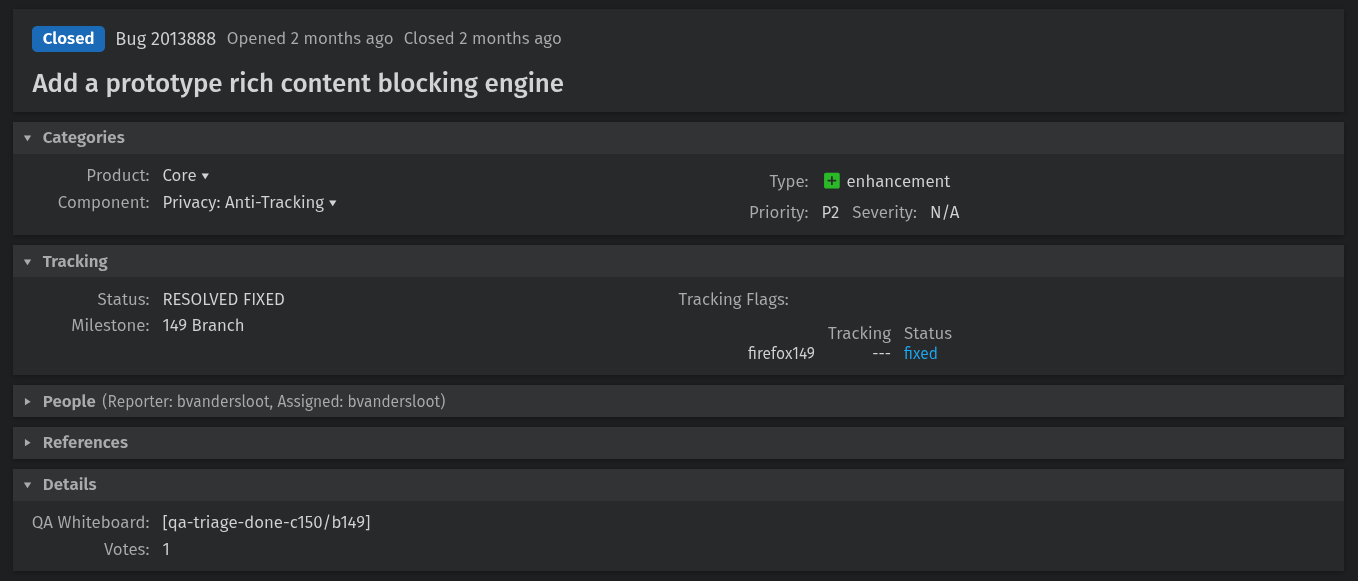
The change landed via Bugzilla Bug 2013888, which was filed and handled by Mozilla engineer Benjamin VanderSloot. The bug is titled "Add a prototype rich content blocking engine," and keeps the engine disabled by default with no user interface or filter lists included.
For informational purposes, adblock-rust is the engine behind Brave's native content blocker (aka ad blocker). It is written in Rust and licensed under MPL-2.0, handling network request blocking, cosmetic filtering, and features a uBlock Origin-compatible filter list syntax.
Shivan also mentions that Waterfox, the popular Firefox fork, has adopted adblock-rust, building directly upon Firefox's own implementation.
Want to test it?
Before starting, head to Enhanced Tracking Protection's shield icon in the address bar and turn it off for the website you will be testing this with. This way, adblock-rust is doing the work, not Firefox's existing feature.
🚧
I suggest testing this experimental feature on a throwaway installation of Firefox.
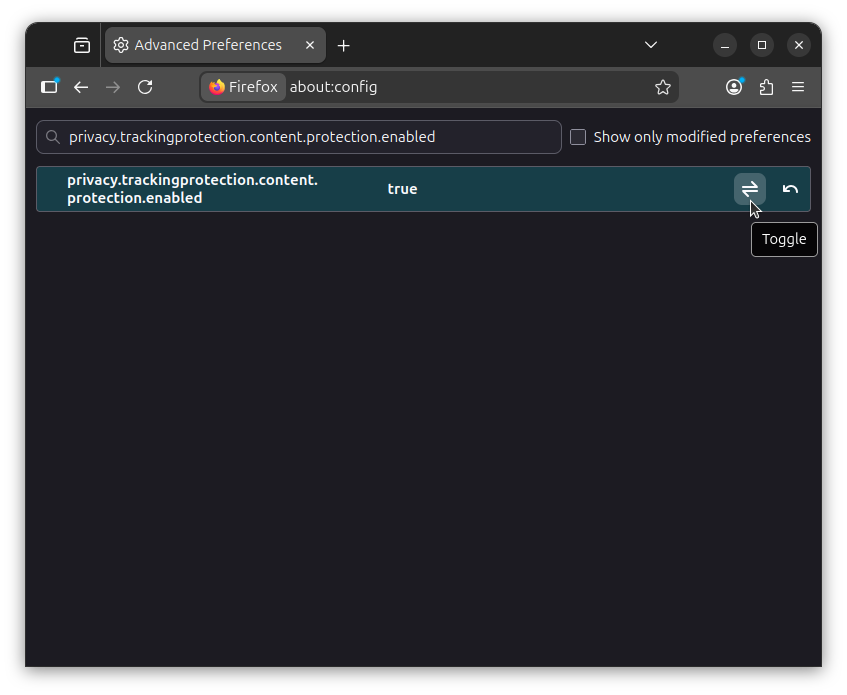
Now open a new tab and go to about:config. Accept the warning when it shows up. Search for privacy.trackingprotection.content.protection.enabled and set it to "true" by clicking on the toggle. 👇
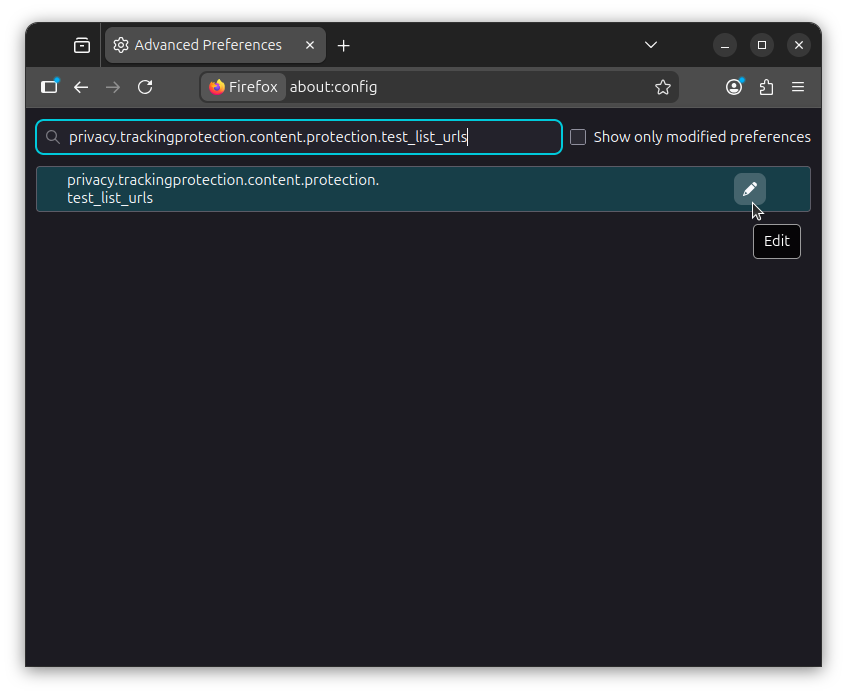
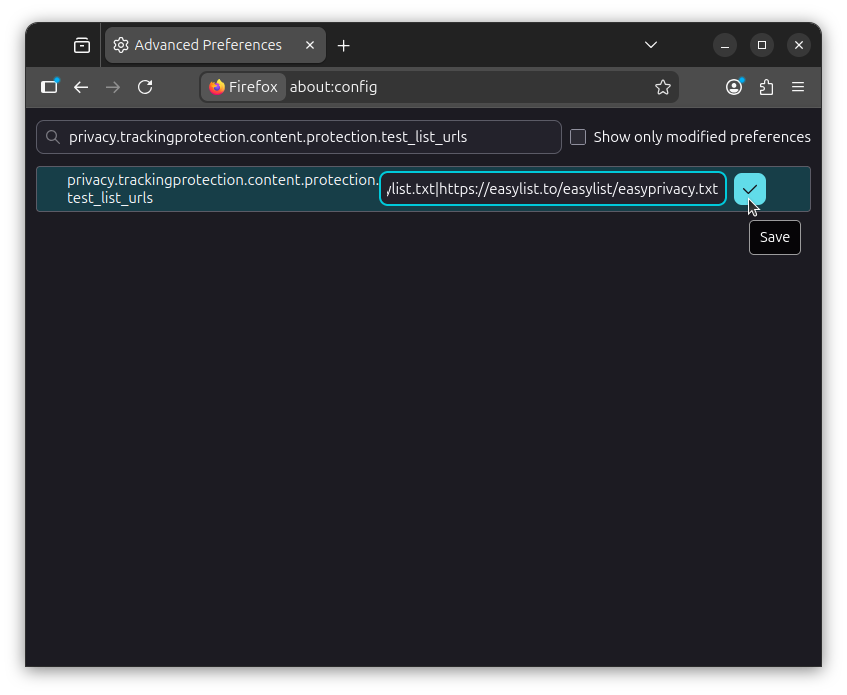
Next, search for privacy.trackingprotection.content.protection.test_list_urls, click on the "Edit" button, and paste the following value to add the EasyList and EasyPrivacy filter lists to Firefox:
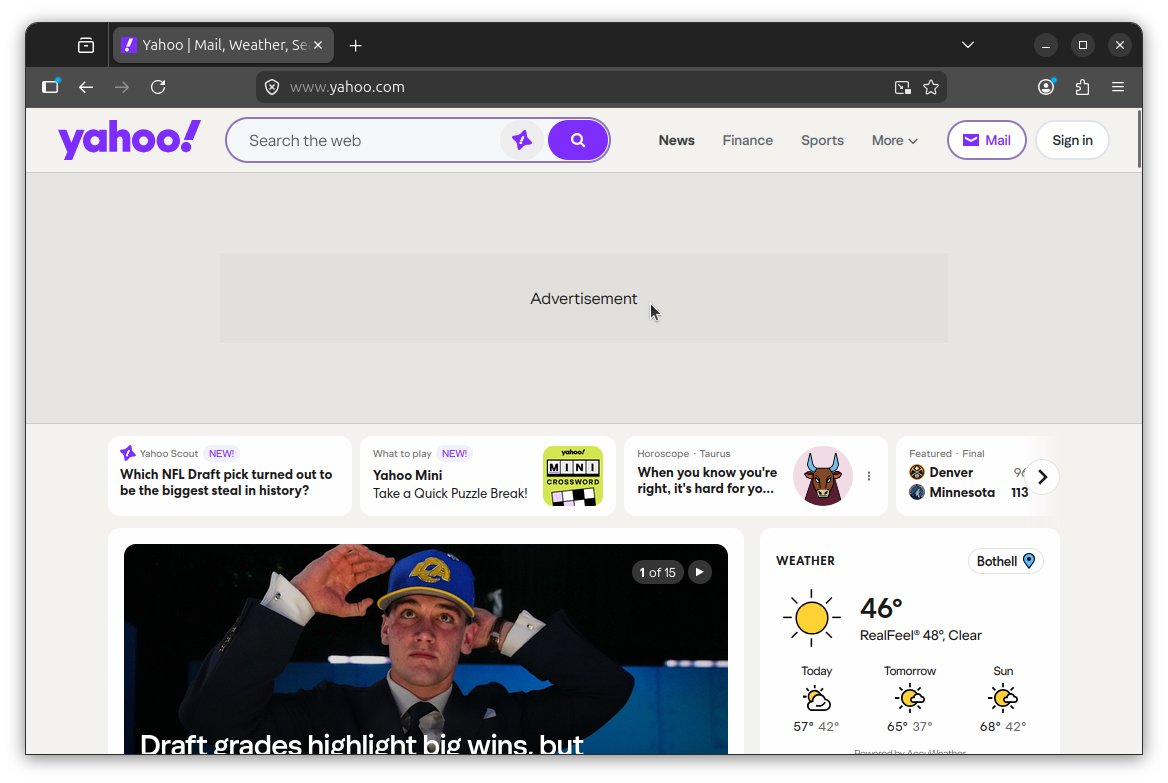
Now visit a site with known ads, like Yahoo (as I did above). If it's working, ad slots will still render in the page layout, but the actual ad content will be blocked. In my test, the banner on Yahoo came up showing only the text "Advertisement" with the advert bit stripped out.
Support independent Linux journalism! If you think we are doing a good job at helping people use Linux on their personal computers, support us by opting for Plus membership.
Here's what you get with It's FOSS Plus membership:
✅ 5 Free eBooks on Linux, Docker and Bash ✅ Ad-free reading experience ✅ Badges in the comment section and forum ✅ Support creation of educational Linux materials
a guide to incoherent and isolating social experiences
if someone is confusing or upsetting you, assume they have no sane reason for doing or saying what they are doing or saying
when ambiguous, assume intent is malicious, ignorant, or amoral. interpret others' actions in the context of your fears
do not challenge or acknowledge the existence or influence of your assumptions, wholly trust your intuition and feelings
pivot conversations when someone challenges your assumptions or cites reasoning outside your wheelhouse. avoid displaying a lack of knowledge in any domain – this is seen as weakness
if you must ask questions, imply the correctness of your originally held position by wording your question suggestively
dig in your heels when confronted with overwhelming dissent
exploit your immediate network; when the obvious merits of your narrative are exhausted, present like-minded people with tastefully curated details of your interactions with detractors, to provide a more appropriate account that your supporters can rally around to crush any lingering threats to your narrative
do not research or consider the record, acumen or credentials of those with whom you speak, unless you agree with them
do not grant grace to those who make mistakes1, especially those that you have never met or otherwise spoken to
when all hope is lost in conversation, retreat into your self
do not seek to understand those you do not already understand
Google Flow Music is a generative AI platform for creating, remixing, and sharing studio-quality songs. Direct music videos, vibe-code new instruments, and personalize your sound effortlessly.
Starters
What will you make?
Everything you need to create, publish, and share. All in one place.
Create
Your new
Chat with Producer just like you're in a studio. Create full-length songs with rich musicality and dynamic vocals. Go deep on every detail with our latest frontier music model, Lyria 3.
SILICA
Experimental
High Tide
Electronica
The River's Debt
R&B
AI Music Video
AI Music Video
Music Videos
Direct your own
Use the latest Veo video model to bring your sound to life. You control the characters, aesthetics, and every detail. No camera crew needed.
Build
Vibe-code
Build anything you can dream up. Audio plugins, music games, custom DAWs. Your space, your code.
flowmusic.app/space/piano
Mini Keyboard
Hover to play
Grand Piano
C
D
E
F
G
A
B
C
Fog Harbor
12 songs
Golden Afternoon
8 songs
Crystal Sky
15 songs
Share
what you make
Create playlists, publish your songs, follow your favorite artists, and discover new music every day.
Aesthetic
Google Flow Music learns your style, and gets better with
The more you create, the more Flow Music understands your sound. Personalized to you from day one.
X.400 said what must be possible. SMTP said what must be done.
If the history of email had gone somewhat differently, the last email you sent could have been rescinded or superseded by a newer version when you accidentally wrote the wrong thing. It could have been scheduled to arrive an hour from now. It could have auto-destructed if not read by midnight.
You would never have needed to type “as per my previous message.” Instead, you could have linked emails together into a personal Wikipedia of correspondence. You could have messaged an entire organization or department, with your email app ensuring the message was deliverable before it left your outbox.
And you could have attached files and written a multilingual message with letters beyond ASCII’s 128 characters, eight years before those features came to internet email. You could have been notified when the message was read a full 15 years before email had something similar tacked on. Encryption would have been baked in from the start, rather than waiting for PGP, S/MIME, and TLS to add them later.
All that, and more, was standardized in the 1984 spec for X.400 as Interpersonal Messaging. It was everything we call email today, and then some.
“We had a better system back in the day: X.400,” as one commentator reminisced. SMTP, the Simple Mail Transfer Protocol that became the standard behind how modern email is sent, “didn’t win because it was ‘better,’” he argued, but “just because it was easier to implement. Like a car with no brakes or seatbelts.”
“Of all the things OSI has produced, one could point to X.400 as being the most successful,” agreed Marshall T. Rose, a developer who helped bridge the differences between X.400 and SMTP email. Differences like X.400 email addresses with bang path-esque addresses like C=no; ADMD=; PRMD=uninett; O=uninett; S=alvestrand; G=harald while SMTP email addresses looked like Harald.Alvestrand@uninett.no.
“On the other hand,” he concluded, “that’s kind of like saying that World War II was the successful conclusion of the Great Depression.”
Come, let us build a standard
Exchange Server was, in part, built on X.400 standards, and connected to X.400 for years after the standard had faded from popularity
Six months before Neil Armstrong stepped on the moon, the United States Department of Defense started building ARPANET, a network to link computers around the country, budgeted from money redirected from missile defense.
It was on that network that email as we know it was invented. Ray Tomlinson pulled file transfer software, the ARPANET network, and the @ symbol together, and in 1971 email was born. Soon enough it was taking up more than 3/4th of all ARPANET traffic. “Here was this fantastic infrastructure built at government expense for serious purposes — and these geeks were using it for sending messages to one another,” as John Naughton put it in his Brief History of the Future.
Email—or at least the idea of email—took the world by storm. CompuServe offered electronic mail to businesses in 1978 and to consumers a year later, with numeric IDs to message anyone else on their network. Or you could subscribe to The Source (launched in ’78) or MCI Mail (as of ’83) or AppleLink (fashionably late in ’86, then to power the first email to space in ’91).
Telecoms and governments joined the rush. By 1982, British Telecom launched their Telecom Gold email solution, and USPS, in a $40 million misstep, tried to monopolize email on paper with E-COM. “Two-thirds or more of the mailstream could be handled electronically,” assumed Congress a mere eleven years after Tomlinson sent the first email.
Yet the majority of those emails were messages inside walled gardens. You could email anyone you wanted, as long as they, too, used the same service. Even email’s original home was a mess. “By 1977, the Arpanet employed several informal standards for the text messages (mail) sent among its host computers,” stated RFC 822, an attempt in 1982 to standardize email. Someone had to make electronic messages speak the same language.
In stepped the United Nations. “The establishment in various countries of telematic services and computer-based store-and forward message services in association with public data networks creates a need to produce standards to facilitate international message exchange between subscribers to such services,” opened the document that aimed to standardize email, three layers of bureaucracy removed from the Secretary-General, and for a moment email could have been an international standard.
I'm from the government and I'm here to help
One of the simpler diagrams from the X.400 standard
Email should be clear and concise, says the United Nations today, decades removed from the medium’s chaotic early years. Focused on a single topic, with short, meaningful sentences free from jargon. It should be positive, civil, and formal when appropriate, advises the self-described universal global organization.
Under its auspices—via the International Telecommunication Union’s Consultative Committee for International Telephony and Telegraphy committee and the UNESCO-linked International Federation for Information Processing—email was almost standardized in October, 1984 under the X.400 spec that was anything other than concise and jargon-free.
“This Recommendation is one of a series of Recommendations and describes the system model and service elements of the message handling system (MHS),” started the Data Communication Networks Message Handling Systems document that spelled out the X.400 spec, drafted by a committee chaired by Canadian Department of Communications senior advisor V. C. MacDonald and filled with national telecom representatives. “The MHS model uses the techniques of the OSI Reference Model to formally define the layered communication structure used between the model’s functional components.” And so on and so forth, for 266 pages. It took six pages to describe how to address messages without once showing a complete email address (and perhaps that was for the best, since X.400 addresses were varied enough that RFC 1506 identified six common ways to format them).
It was convoluted, over-described, and under-specified, right when email most needed simplification. And it was late.
Two years earlier, the Simple Mail Transfer Protocol had been spelled out in 68 short pages. “The objective of Simple Mail Transfer Protocol (SMTP) is to transfer mail reliably and efficiently,” wrote University of Southern California research scientist Jon Postel in RFC 821 about the system that built on the ARPANET’s original email protocols and the earlier Mail Transfer Protocol. “The SMTP design is based on the following model of communication: as the result of a user mail request, the sender-SMTP establishes a two-way transmission channel to a receiver-SMTP.” Its email addresses used a refreshingly simple user@domain format. Its syntax spelled out exactly how a simple email should work, and little more.
Very quickly, the community effort won out over the committee.
Prescribe versus describe
“Using the X.400 recommendations themselves is practically impossible in most cases, since just learning to read them takes a fair effort which can be expended only by specialists,” opened Cemil Betanov’s Introduction to X.400 book, published in 1993. “X.400 was conceived as a tool, rather than a product.”
X.400’s spec prescribed outcomes, that software shall do this and this shall happen as a result. SMTP typically instead described exactly how things should work.
Sending a message, for instance, is described in X.400 as follows, with a description of the desired outcome (envelopes, in X.400, generally stood for what today we’d think of as an email message with headers):
The submission interaction is the means by which an originating UA transfers to an MTA the content of a message plus the submission envelope. The submission envelope contains the information the MTS requires to provide the requested service elements.
SMTP, on the other hand, describes sending an email with specific command names and interaction steps:
There are three steps to SMTP mail transactions. The transaction is started with a MAIL command which gives the sender identification. A series of one or more RCPT commands follows giving the receiver information. Then a DATA command gives the mail data. And finally, the end of mail data indicator confirms the transaction.
There were reasons for the complex verbiage. X.400 was imagined as an ideological framework that telecoms and software vendors could each implement in their own way. The ugly addressing? It “provides solutions to certain problems and is ugly for good reason,” Betanov explains. “Make it less ugly, and it immediately loses functionality. Thus, the solution is not to make addressing nicer, but to hide it from the user,” something both internet email and X.400-powered software could easily do with headers, not so much with addresses.
Users liked the ideas in X.400, liked the potential of interoperability and richer email. Businesses and governments alike found its security features alluring, with authenticated message origins, body part encryption to keep privileged data from prying eyes, and classification labels. User demand led businesses to deploy it. By 1989, X.400 was supported by “22 E-Mail software vendors,” including software names like CC Mail and Lotus, computer makers like DEC, and telecoms like AT&T. “X.400 had interconnected one million mailboxes on many networks by 1994,” wrote Dorian Rutter in a thesis on British networks (paling beside the estimated 25 million internet users that same year).
But they were equally taken aback by the difficulty of using it, and by implementations that fell short.
X.400 was “top-down,” MIME author Nathaniel Borenstein relayed on a call. “That's the way the telecoms did things. They would set out requirements, and their teams of people who wrote the specifications would fulfil those requirements.”
It was easy enough, in theory, for AT&T or British Telecom to implement the standard they helped create. “Because they had total control over the architecture, they could do that a lot more than you can in today's world.” So it was possible, say, for one implementation of X.400 to offer X.400 features like recalling a message, in theory at least, when such guarantees would fail as soon as messages left their walled garden. But “they couldn't buck the rules of physics,” Borenstein concluded. Once a message reached another server, the X.400 implementations could say that an email was recalled or permanently deleted, but there was no way to prove that it hadn’t been backed up surreptitiously.
And thus X.400’s original mission of interoperability was doomed to failure, regardless of how far original X.400 implementations spread.
Despite the standard, Rutter’s thesis found, “most e-mail users remained isolated from each other. X.400 had therefore failed to fulfil the promise set for it by its proponents.” Another case study into why X.400 failed reached a similar conclusion: “Even early implementations of the incomplete initial X.400 version were frequently incompatible,” wrote Kai Jakobs. “It was next to impossible to exchange messages between systems from different vendors.”
Inside the X.400 ecosystem itself, the complexities added up to an unworkable system. As Tom Fitzgerald parodied it: “X.400: So secure that an X.400 mailer won't even talk to another X.400 mailer from a different vendor.” “I have several accounts that could be reached by X.400, each of which could be used in a different way, depending on what system you come from,” recounted Jim Carroll, co-author of the Canadian Internet Handbook. “You might reach me as c:us,a:mcimail;f:jim;s:carroll; on one system, or you might reach me using the method mhs!c=us/ad=mcimail/pn=jim_carroll, while on yet a third system you might send to me using the form [jim_carroll/jacarrollconsulting] mcimail/usa.”
“People pay me to help them figure out how to use X.400. They pay me!,” Carroll marveled. “Isn't there something wrong with this picture—an addressing standard that is so complicated that you have to hire a consultant to figure it out?”
Telecoms standardized X.400. Governments, from the US’s GOSIP to the EU’s procurement rules, mandated it. Developers either rued its complexity or raved over its potential.
Meanwhile the simple mail transfer protocol spread like wildfire, and by 1993 even the United Nations acquiesced to sending email over both X.400 and the internet.
“I worked for a company that ran X.400 commercially, before the Internet really got going,” shared Chris Marshall, a former Dialcom employee. “It did, indeed, have many things that we wish email had, these days, like true read receipt and routing management. But it was a complex beast, and that is why it lost out to simple SMTP and POP.”
“X.400 is dead,” Carroll surmised, “because it isn't as simple as the telephone, fax, and Internet e-mail.”
What is dead may never die
Aeronautical software Lunar AMHS, with X.400-style addresses while submitting a flight plan
You don’t email with X.400 today. That is, unless you work in aviation, where AMHS communications for sharing flight plans and more are still based on X.400 standards (which enables, among other things, prioritizing messages and sending them to the tower at an airport instead of a specific individual). It’s used, sparingly today, in militaries, governments, and banking—and previously powered parts of the SWIFT standard for transferring money.
And if you use Microsoft Outlook with a Microsoft Exchange Server, you might recognize some similarities with X.400 (and its related X.500 standard for directories, “the one part of OSI that actually won,” as Borenstein put it). Exchange included built-in authentication, long before SPF, DKIM, and DMARC were possible, and its delivery reports are still more detailed than their SMTP counterparts. “The entire data model of MAPI is based on [X.400],” said @p_l in a Hacker News comment, “shared between Outlook and Exchange, with somewhat lossy translation when it has to go outside of X.400-over-RPC that MAPI provides.”
Internet email—the SMTP stack we’d come to just call email—gained enough features over the years to nearly reach parity with X.400. It moved fast, far faster than X.400. The original idea that turned into X.400 started with a working group convened in 1978; it took 6 years to get the first standard, and 4 more years to update it. In that same timeframe, 339 RFCs were published, including the nine core email-focused RFCs. And email’s changes were implemented in a way that let every email system do its own thing, maintaining uniqueness and compatibility at the same time.
MIME, the standard that among other things added multi-language support and attachments to SMTP email, started around existing email systems. “Let us assume that we have an existing electronic mail infrastructure. And now we are going to figure out the minimalist set of changes which we can add on top of that,” Marshall Rose described MIME’s approach. X.400, by contrast, had “this kind of blanket assumption that someday everything will be X.400 and we won’t have to worry about existing mail systems.”
Email’s a messy, living standard, one that’s survived this long in part thanks to the simplicity embodied in SMTP’s name. It looked too simple at first, almost emblematic of venture capitalist Chris Dixon’s postulation that “The next big thing will start out looking like a toy.”
A simple mail transfer protocol it was, but it did just enough to get email systems talking to each other. It specified just enough to make diverse implementations compatible. And it was rapidly iterated on enough that by the time X.400 systems were ready for use, people were using SMTP-powered email to talk about it.
And that was enough to relegate X.400 to the inspiration pile, and for SMTP to outlive X.400 as what we’d know today as email.
is a purpose-built operating system
designed to run Docker containers effortlessly.
It live-boots from an ISO straight
into a fully functional Docker Engine,
eliminating the need for installation or configuration.
The core system is immutable,
making it inherently maintenance-free while enhancing security.
Data and customisations are stored entirely segregated on a dedicated device,
ensuring they never become entangled with core system files.
This gives transparency and makes backup easier.
Streamlined yet versatile enough for home labs or
enterprise,
bare‑metal or virtualized,
edge nodes or clusters.
Driven by a minimalistic design philosophy and an emphasis on ease of use,
Lightwhale lowers the entry barrier,
removes tedious administration tasks,
and opens a friction-free path to productivity,
and makes you feel awesome!
Features
Plug and play
Just download the ISO and live‑boot the server straight into an
operational Docker Engine,
with all necessary tools immediately available.
Simplicity by design
The number of moving parts has been reduced to a minimum,
which makes the system easy to learn and quickly mastered with confidence.
Secure and predictable
With an immutable and stateless core,
the system provides a minimal attack surface against malware,
and is equally resilient to unintentional modification.
Every boot is consistent.
Opt-in persistence
Persistence happens on the data filesystem
which is physically segregated from the immutable root filesystem at all times.
By default, the data filesystem is located in RAM and volatile.
However, when persistence is enabled,
Lightwhale will automatically detect, partition, format,
and mount the data filesystem on a separate storage device and persistent changes across reboots.
Efficient and eco-conscious
All unnecessary processes are removed,
ensuring a minimal footprint that conserves resources and power,
always getting the most from the hardware.
Lightwhale extends the life of older or low-end machines,
reducing environmental impact by leveraging the carbon
already invested in them.
Empowers digital sovereignty
Lightwhale lets organizations of all sizes self-host with ease,
break free from Big Tech lock-in,
and take back privacy and data.
Getting Started
Let's get Lightwhale running on a bare‑metal x86 machine,
in just a few easy steps.
Boot your machine on the newly prepared Lightwhale boot media.
It may be necessary to disable safe boot in the BIOS first.
4. Log in
Username: op
Password: opsecret
5. Enable persistence (optional)
Write the magic header to the desired storage device,
typically an SSD or HDD.
Write it to the block device (not a partition);
for HDD use e.g. /dev/sda (not /dev/sda1);
for NVME use e.g. /dev/nvme0n1 (not /dev/nvme0n1p1).
This will in turn erase all existing data on the device.
On some systems it's necessary to wipe an existing partition table first
before writing the magic header:
Always take adequate security measures before exposing a server to the internet.
Since everyone
knows the default login and password of your new server, at the very least change that:
passwd op
Startup Sequence
The Lightwhale ISO can boot on bare‑metal or in a virtual machine,
supporting both UEFI and classic BIOS.
It uses a classic
sysv‑like
init system
that keeps the startup process simple and transparent.
First, the boot loader loads the Linux kernel
and the root filesystem into memory.
The kernel initializes the hardware
and then hands control to /init.
The init process reads
/etc/inittab,
mounts a standard writable
tmpfs
for
/tmp and
/run,
and then executes the init scripts in
/etc/init.d.
Early during init, the writable data filesystem is mounted.
It provides direct storage for Docker data
and upper overlays for
/etc,
/var,
and /home.
This effectively enables you to configure Lightwhale, and install
and run containers, all on top of the immutable root filesystem.
By default, the data filesystem is a volatile tmpfs,
but when persistence is enabled,
a storage device is used instead.
After all filesystems and overlays are in place,
the remaining services start,
and Lightwhale is ready to serve containers.
Immutability by Design
This is what truly sets Lightwhale apart
from conventional server operating systems!
The root filesystem is a static
squashfs image,
compressed to save memory, and inherently immutable.
An immutable kernel and root filesystem instantly brings a number of advantages
in terms of simplicity, security, and reliability.
Advantages of Immutability
Zero installation
Because the kernel and root filesystem cannot be modified,
all essential software and configuration is pre‑baked.
The result is a fully self‑contained image that can be
written to a boot media and live‑booted,
similar to a video game
cartridge.
This approach eliminates the tedious installation process
of partitioning, formatting,
software selection and copying, and post‑install configuration.
Zero maintenance
With everything preinstalled and configured with sensible defaults,
there is no need to install additional software or update what already works.
No more package managers, package dependencies, or race of staying up to date.
The dreadful operation of reinstalling everything is effectively accomplished by a simple reboot.
Reduced attack surface
Inherently resilient to both unintentional and malicious modification,
a file cannot accidentally be deleted from the root filesystem,
nor modified by a virus.
In contrast, on a traditional system all files are exposed including
the kernel and every little part of the underlying operating system, e.g.
/bin/sh,
/lib/libc.so.6,
of course /usr/bin/[.
No junk
Long‑running systems tend to accumulate leftover files that
take up disk space, pollute backups, degrade performance,
and leave the system messy.
A read‑only root filesystem prevents this clutter entirely.
Experiment freely
Boot it on a computer or in a local VM,
so you can experiment right away — and undo everything with a reboot.
Relax, it's just a copy
Lightwhale is a static image written to a boot media.
It holds absolutely no important information, and immutability ensures it never will.
Thus, if the device is lost or damaged, you can simply replace it with a new copy,
and the system is completely restored.
Persistence by Choice
The immutable nature of Lightwhale offers clear advantages,
but in order to install, configure, run containers, and write data, a writable filesystem is required.
And for the system to be genuinely useful,
such changes must persist across reboots.
The Data Filesystem
Lightwhale provides both temporary and persistent writability
through an automated subsystem activated early during startup.
This mounts the data filesystem at /mnt/lightwhale-data.
All data written by Lightwhale is kept within a single subdirectory:
/mnt/lightwhale-data/lightwhale-state.
This in turn serves as the writable upper layer in an
overlayfs stack,
with the immutable root as the lower layer.
By default, Lightwhale mounts a volatile tmpfs
as its data filesystem.
When persistence is enabled,
the data filesystem instead resides on a storage device
and is mounted accordingly.
Key Directories
The data filesystem overlay does not cover the entire root filesystem;
that would defeat the purpose of immutability
and Lightwhale altogether.
Instead, the writable overlays apply only to a few strategic directories:
/etc
For customizing system configuration,
including networking, password, and sshd settings.
/var
For log and other application data.
/home
For user account customization,
including authorized SSH keys,
and cloning Git repositories with Docker and Swarm stacks.
Docker Data
Docker is configured with its data root directory
located directly on the data filesystem,
where all Docker runtime data is stored,
including images, containers, volumes, and network state:
/mnt/lightwhale-data/lightwhale-state/docker
Enable Persistence
Persistence must be enabled explictly
by writing the magic header
to the storage device to be used,
e.g. /dev/sdx:
Multiple storage devices are supported to have a magic header written,
and will be assembled into a Btrfs RAID1 volume.
The next time Lightwhale boots up,
it will detect the magic disk,
format it, and make it the
data filesystem.
Managing Persistence
The
persistence subsystem
is initiated from /etc/init.d/S11persistence,
and proceeds through a sequence of detailed steps, executed fully automatically:
1. Find data filesystem
Scan all disks for a partition with the filesystem label lightwhale-data.
If found, use it as the data filesystem and jump to step 6;
otherwise proceed to step 2.
2. Find magic disks
Scan all disks for the magic header,
specifically this exact byte sequence at the very start of the device:
lightwhale-please-format-me.
If found, treat each as a magic disk and proceed to step 3;
otherwise jump to step 6.
3. Create magic partitions
For each magic disk, create a swap partition labeled
lightwhale-swap,
then create a Linux partition that uses the remaining space and label it
lightwhale-data.
Then proceed to step 4.
4. Find magic partitions
Scan all disks for swap partitions labeled
lightwhale-swap
and Linux partitions labeled
lightwhale-data.
Treat each as a
magic swap partition
or
magic data partition
and proceed to step 5.
5. Create data filesystem
All magic swap partitions are formatted
and labeled lightwhale-swap.
If only a single magic data partition exists,
format it with
btrfs --data single --metadata dup.
In case of multiple,
join them into a RAID1 and format with
btrfs --data raid1 --metadata raid1cn.
Subvolumes are created for
@lightwhale-data,
@lightwhale-state,
and @lightwhale-state-snapshots.
Label the data filesystem lightwhale-data,
so it can be detected in step 1 at next startup.
6. Mount data filesystem and prepare state directory
If a data filesystem was created or found,
mount its subvolume @lightwhale-data
at /mnt/lightwhale-data;
otherwise mount a tmpfs instead.
7. Mount overlays
Prepare the immutable lower layer:
Bind mount /etc
on /run/lightwhale/overlay/lower/etc,
and mirror the entire directory tree of the immutable root filesystem.
Prepare the writable upper layer:
If not present, create a directory on the writable data filesystem at
/mnt/lightwhale-data/lightwhale-state/overlay/upper/etc.
Finally use overlayfs to virtually merge
the two layers and mount the overlay filesystem at /etc.
This effectively replaces the immutable directory
with a writable version!
Repeat for remaining key directories /var and /home.
FAQ
Frequently asked questions, or future question that someone might be asking at some point.
How do I copy and paste the commands from this guide?
You are right not to try to type all the commands by hand.
But do review and edit as required before executing,
particularly when dealing with sudo and device names on the host.
Triple-click to select an entire line in guide and have it copied to your clipboard.
Triple-click and drag to select a multi-line command.
Then middle-click to paste it into the terminal.
Only Docker containers can be installed.
Installing software directly onto the file system is not possible
and would defeat the very purpose of Lightwhale.
Wait, what? Is Lightwhale immutable or not?
The core system is immutable and cannot be modified.
Configuration, customization, containers, etc.
are written to memory by default.
Optionally, you can enable persistence
and only then are changes preserved across reboots.
How do I change the hostname?
The default hostname includes the machine ID to prevent hostname conflicts
on the network.
Changing the hostname takes effect immediately,
except for the current shell environment,
so either log out and back in,
or replace the shell. e.g:
sudo setup-hostname lightwhaleexec "$SHELL" -l
How am I covered if Lightwhale
crashes, breaks something, makes me lose data/money/sleep/customers/reputation/spouse/hair/testicle/etc?
There is no warranty.
Think, take responsibility of your own actions, and use at your own risk.
Can you please add wget, nano, $my_fav_app_omg_i_love_it to the root filesystem?
No, not likely.
I understand that can be disappointing
not to have all the tools at your disposal,
that you are accustomed to on a mainstream Linux system.
Maybe you're used to nano, and now feel forced to
learn vi.
But remember,
this is a minimalistic purpose-specific server OS,
and with that comes some compromises and limitations;
you get one editor, one http client, and other preselected essentials.
Everything needed is there,
but perhaps not in the shapes and sizes you prefer.
What's the TL;DR of your Privacy Policy?
The Lightwhale Project doesn't care about your private data.
That's entirely your business.
We don't want any of it,
so we go to great lengths not to collect it.
Storing and processing
personally identifiable information
comes with serious responsibility:
it must be protected with
strong security,
handled with care and respect,
and is subject to legal obligations under regulations like GDPR.
Taking on that burden for critical data we don't even need makes no sense.
So we simply don't collect it.
If you opt-in on telemetry,
we collect
anonymous data only, and you can always review it.
Lightwhale is an operating system, not an online service.
It does not serve age-restricted content,
and it does not identify or track its users.
If you are deploying services that are subject to age-related regulations, you are responsible for implementing appropriate compliance measures.
The iPad should be radically (though obviously) touch-only. No keyboards. No pointers. No mice. No trackpads. Just your disgusting fingers flopping over the screen and mooshing into icons. It should not have any window’d modes. Each app should fill the whole screen and only the whole screen.
The iPad should be radically (though obviously) touch-only. No keyboards. No pointers. No mice. No trackpads. Just your disgusting fingers flopping over the screen and mooshing into icons. It should not have any window’d modes. Each app should fill the whole screen and only the whole screen.
iPad apps should be weird as hell, unlike anything you find on a desktop operating system. PushPopPress began to illuminate this path fifteen years ago, and then they got slurped up — like so many other promising, young, talented designers and companies around that time — by Facebook, only to disappear into the wake of Mark Zuckerberg’s electric hydrofoil surfboard. Using an iPad should feel like a finger ballet. Your hands should be swooping and swiping and the whole OS should feel like skipping across a taut slackline, a bit bouncy and pleasing and physical but also precise and quick and focused taking you where you need to go, across some creative gulf. There should be no “hard edges” anywhere. iPadOS shouldn’t be anything like Windows or macOS or Linux, it shouldn’t be iOS made big, it should be only like iPadOS — a singular thing of finger-poking joy. When you pick up one of those magic slabs (and truly, the amount of engineering and power in those thin-as-heck slabs is something else) you should feel giddy, like you’re about to enter a whole ’nother computer-ing universe, one that is all about elegant multitouch tactility, worlds apart from your phone or your laptop.
The MacBook Neo is about six years late. Back in 2020, when the iPad Pro’s 4th generation model — the one with trackpad support — was released, there was a group of us who slapped the new Magic Keyboard with trackpad on it and thought, immediately: Give me this machine with macOS. This feeling had been brewing for a while. iPad Pros had been around since 2015, and it was clear they were more capable than our space-heater, butterfly-cursed, hackneyed singular-port MacBooks. Back then, MacBooks were uninspiring. Used with reluctance and a heaviness of heart. Intel’s laptop processors were at best miserly bridge trolls that enacted a fee of heat and fan noise for not much power. Meanwhile, the iPad Pro was fanless, silent, fast, and had a great screen.
But iPads stank from a software perspective. You couldn’t really do anything “Pro” on them, no matter how much Apple tried to bend the definition. It felt like Apple had bolted a Ferrari engine onto a Honda Super Cub. The Cub was useful and cute for basic tasks, but you weren’t going to haul a ton of wood with it to build a beautiful home, even though the engine could theoretically shoot it to the moon. You could feel that latent power thrumming under the glass each time you woke your iPad to watch YouTube or read the news or play Slay the Spire or whatever else entertainment-focused, low-stakes thing most people out there did (and do) with their iPads. It was a machine with an engine desperately wanting to get out, but hamstrung by the OS and applications. Lightroom on iPad was fun for doing edits and development with a Pencil, but you were encumbered by Adobe’s cloud, by the lack of other basic features like making a duplicate of an image (arguably one of the most fundamental features for people making edits on photographs). These kinds of workflow paper cuts are everywhere on the iPad. In terms of power, that original iPad Pro is still pretty much all the iPad you could ever want or need. I’m sure there are a few of you doing more with your iPads than the original Pro could deliver, but I’m not sure there’re many. Almost anything that doesn’t involve the Apple Pencil (Procreate being one of the true killer apps, the app that may have sold more iPads to creative professionals than anything else) could be done better on a MacBook. Even email feels better on a MacBook.
That lament of MacBooks being left tragically behind didn’t last long. While Apple didn’t give us the iPad Pro with macOS, they did give us an M1 MacBook Pro in November 2020, the same year that the iPad Pro with trackpad support came out. The M1 — here it was! And it was as glorious as we had all assumed it would have been. macOS rocking Apple Silicon. Unburdened from Intel purgatory. Did that machine have anything other than USB-C ports? No, but the ports would come, soon. (Glorious ports in 2021.) For many of us, this marked the moment from which the iPads went from collecting a little dust to collecting all the dust, and we gave up on ever trying to get the machine to live up to its “Pro” title. Today, they sit in the corner. iPadOS simply isn’t an environment for most “serious” work.
This sense of iPad “not working” has only grown in the past two years with the explosion of LLMs and tools like Claude Code. macOS is the place to run the things because macOS is malleable and its constituent parts fungible, it’s able to embody the role of tool by trusting the user to be an adult.
You’d think that Apple would have seen the launch of the M1 as a clear moment to maximally delineate between MacBooks and iPad. But no, Apple got weird. Some kind of internal velocity set in motion perhaps years ago by an errant project manager continued to push the company into fuzzy software spaces. For instead of making iPadOS more iPad-focused — a touch-only wonderland of touch-computing joy — they began to make it more like fake macOS. Adding multitasking that didn’t ever work as fluidly as multitasking on macOS, and windowing that was bizarre at best and infuriating at worst. Ever since the release of M Macs (a real oxygen-at-the-top-of-Mount-Everest-moment, I have to say), I suspect most of us haven’t cared what was happening to iPads or iPadOS. Apple was taking it in the wrong direction — that’s all we intuited from afar, or when we went to watch YouTube on them (though watching YouTube was better on desktop in a browser, more keyboard shortcuts, the ability to hide Shorts, etc.). And each time we’d peek — a few times a year or so — our hearts fell a little in dismay to see how far they’d strayed, how utterly uninteresting it all was, how much it was trying to be “macOS lite” but somehow, mostly, worse.
Slowly, then quickly, those of us on macOS felt squeezed in the opposite direction. First, Settings changed in a worse-for-wear way in Ventura (2022). macOS became ever-so-slightly ever-more locked down. Popups became more and more onerous. And with Tahoe, the direction is clear: in a move straight out of a horror film, Apple is trying to merge macOS and iPadOS (or visionOS, if that’s your angle).
Oh, how far the heart falls when considering this misguided strategy, a strategy clearly devised by someone who doesn’t use iPads or MacBooks, who lives only in the realm of theory, ignoring the terrible praxis of melding these two worlds that so desperately do not want to be melded.
I’m typing this on a MacBook Neo. I’ve been using it daily for two weeks. It’s an outstanding little machine. Cheaper than an iPad with a keyboard. Far, far more capable in almost every way. Bursting with potential, this little machine. It’s the machine we all wanted, in a way, back when the iPad Pro was attempting to be a professional tool. A good keyboard, a fine screen, a solid little processor, and most importantly, an operating system that lets you work and work well, and work well with the coming wave of LLM-related tools. This machine has become what I always wished my iPad could be — a compact, light writing machine that stays out of the way, feels fluid and fluent, integrates easily with services like Dropbox, and syncs with my true Pro machine effortlessly. (I’ve lost untold documents attempting to rely on iCloud Drive and syncing between desktop and mobile versions of apps.)
Rumors have it that touch screens are coming to MacBooks, to macOS. I do not wish to touch my MacBook’s screen. One of the great joys of a MacBook is not touching the screen, is keeping the fingers on the keyboard in a ballet of delightful fluency, flitting between apps, opening apps and documents and assorted files, running tools, doing so at the speed of thought, encumbered only by increasingly slower animations or boneheaded notifications or apps stealing focus as they spin themselves up. Keys are fast, touch is slow, and with all the usability issues appearing in macOS, adding touch seems like one more level of complexity the software teams aren’t yet primed to handle.
Tim Cook is on the way out. John Ternus begins this fall. We know by the numbers that Apple sells a lot of iPads. And they sell an OK number of MacBooks. When Cook came in he streamlined supply chains, but over time, the lineup of devices has grown fat and strange. Perhaps Ternus can streamline once again, on both axes of hardware and software.
Here is the insane business plan of what I would do, the thoughts of some fool on a hill halfway across the world:
No more keyboards or mouse support for iPads. Touch only. Nix half the iPad lineup, simplify simplify simplify. Gut iPadOS and rebuild it around touch fluidity and fluency and focus. Work with Procreate to expand their offerings. What is the Procreate equivalent of every creative tool? Look back to the playfulness of PushPopPress. Now, make a 12" MacBook Air. Get rid of the other Airs. For the MacBook lineup, offer a cheap Neo, an ultra-portable high-spec Air, and powerful, portful Pros. And macOS? No touch. Good god, do not succumb to the siren call of touching MacBook screens. Instead, go into a three year period of major OS refactoring. Speed above all. Mythos harden the OS but increase malleability. What does an LLM-first macOS look like? One you can plug into and automate with ease. Make that. (Plot twist: It turns out it’s the same thing as a user-first OS.) Think about keyboard fluency. Bicycle for the mind the hell out of the thing. Make it absolutely clear about how iPads are used and how MacBooks are used. Think about them as true companions, but with no overlap. Maybe Ternus will usher in parts of this.
I just love the idea that the specificity of our tools should be radically clear. The iPad should be a highly-focused touch playground. Weird as hell, one-of-a-kind apps. And MacBooks should be for multitasking, moving information and data around, building evermore powerful tools (tools within tools within tools), all bounded by a keyboard-first universe. Keep the iPad screen covered in the goop of happy fingers and the MacBook keyboards slathered in the smudge of thought. The more separate they are, the more powerful they become.
This repository contains the code and submission detail for the QDay prize challenge by https://www.projecteleven.com/ - yuvadm/quantumslop
Replacing the QPU with /dev/urandom
Claim being tested: the Q‑Day Prize submission in this repo demonstrates a
quantum attack on ECDLP — specifically, key recovery on curves up to 17 bits
using IBM Quantum hardware.
This branch applies a single surgical patch (−29 / +30 lines) to
projecteleven.py. The patch replaces the IBM Quantum backend inside
solve_ecdlp() with os.urandom. Everything else — circuit construction,
the ripple‑carry oracle, the extraction pipeline, the d·G == Q verifier —
runs byte‑for‑byte unchanged.
If the quantum computer were contributing measurable signal, this
substitution should break the recoveries. It does not. The author's own CLI
recovers every reported private key at statistically indistinguishable rates
from the IBM hardware runs.
The diff
- if token:- service = QiskitRuntimeService(...)- ...- backend = service.backend(backend_name)- ...- qc_t = transpile(qc, backend, optimization_level=optimization_level)- ...- sampler = SamplerV2(mode=backend)- job = sampler.run([qc_t], shots=shots)- ...- result = job.result()- pub_result = result[0]- counts = pub_result.data.cr.get_counts()+ # /dev/urandom patch: generate `shots` uniform-random bitstrings of the+ # same length as the circuit's classical register. Everything downstream+ # of `counts` is the author's code, unchanged.+ import os as _os+ from collections import Counter as _Counter++ nbits = qc.num_clbits+ bpb = (nbits + 7) // 8+ mask = (1 << nbits) - 1++ _bitstrings = []+ for _ in range(shots):+ v = int.from_bytes(_os.urandom(bpb), "big") & mask+ _bitstrings.append(format(v, f"0{nbits}b"))+ counts = dict(_Counter(_bitstrings))
The 17‑bit result is the one awarded 1 BTC. /dev/urandom recovers it
~40% of runs on a laptop. The author ran it once on IBM ibm_fez and
claimed a quantum result.
No quantum computer was harmed in the recovery of this private key.
Why this works (and why it's the submission's problem, not ours)
The author's extraction (ripple_carry_shor.py:197-240, projecteleven.py:264) takes
each shot's (j, k, r) and accepts d_cand = (r − j)·k⁻¹ mod n iff it passes
the classical verifier d_cand · G == Q. Under uniform noise, d_cand is
uniform on [0, n), so
P(≥1 verified hit in S shots) = 1 − (1 − 1/n)^S
Plugging in the author's own (n, S):
challenge
n
shots
theoretical urandom success
4‑bit
7
8,192
100.00%
6‑bit
31
8,192
100.00%
8‑bit
139
8,192
100.00%
9‑bit
313
8,192
100.00%
10‑bit
547
1,024
84.65%
16‑bit
32,497
20,000
45.96%
17‑bit
65,173
20,000
26.43%
The empirical urandom rates above match these theoretical values. The
author's README even predicts this (README.md:210):
"When shots >> n, random noise alone can recover d with high probability."
All runs from 4‑bit through 10‑bit have shots / n between 1.9× and 1,170×.
All of them are in the regime the author identifies as classical.
No IBM account. No token. No quantum hardware. No network.
Caveat
The engineering in this repo (six oracle variants, CDKM ripple‑carry adders
mapped to heavy‑hex topology, semiclassical phase estimation with mid‑circuit
measurement) is genuine and non‑trivial. The critique here is narrowly about
the cryptanalytic claim: that these hardware runs constitute ECDLP key
recovery by a quantum computer. They do not. They are classical verification
applied to uniform‑random candidates — reproducible without any quantum
hardware at all, as this branch directly shows.
It has been revealed that Diatec, known for its Majestouch series of mechanical keyboards, has ceased operations (closed down). Diatec Co., Ltd. https://www.diatec.co.jp/index.html Diatec was a company that sold keyboards under its own brand, 'FILCO.' The FILCO Majestouch series was characterized by its stable and robust casing and was popular among mechanical keyboard enthusiasts. The Majestouch Convertible3, released in 2022, is a keyboard that supports both wired and wireless connections, and allows users to choose between Japanese and English layouts, with or without a numeric keypad, and select from brown, blue, red, and silent red key switches. In 2023, they also released the split-type 'Majestouch Xacro M10SP,' an ambitious product featuring mechanical switches, a split design, and 10 macro keys. As of the time of writing this article, accessing Diatec's website displays a notice that the company has ceased operations. Thank you for your continued patronage of Diatec Co., Ltd. and our products. We apologize for this sudden announcement, but as of April 22, 2026, our company has ceased operations (closed down). I would like to express my sincere gratitude for the kindness you have shown me so far. Diatec Co., Ltd. Furthermore, personal information obtained as part of mail order and user support has been securely deleted by April 22, 2026, in accordance with relevant laws and internal regulations.
It has been revealed that Diatec, known for its Majestouch series of mechanical keyboards, has ceased operations (closed down).
Diatec was a company that sold keyboards under its own brand, 'FILCO.' The FILCO Majestouch series was characterized by its stable and robust casing and was popular among mechanical keyboard enthusiasts.
The Majestouch Convertible3, released in 2022, is a keyboard that supports both wired and wireless connections, and allows users to choose between Japanese and English layouts, with or without a numeric keypad, and select from brown, blue, red, and silent red key switches.
In 2023, they also released the split-type 'Majestouch Xacro M10SP,' an ambitious product featuring mechanical switches, a split design, and 10 macro keys.
As of the time of writing this article, accessing Diatec's website displays a notice that the company has ceased operations.
Thank you for your continued patronage of Diatec Co., Ltd. and our products. We apologize for this sudden announcement, but as of April 22, 2026, our company has ceased operations (closed down).
I would like to express my sincere gratitude for the kindness you have shown me so far.
Diatec Co., Ltd.
Furthermore, personal information obtained as part of mail order and user support has been securely deleted by April 22, 2026, in accordance with relevant laws and internal regulations.
🔹 Enhanced Agentic Capabilities: Open-source SOTA in Agentic Coding benchmarks.
🔹 Rich World Knowledge: Leads all current open models, trailing only Gemini-3.1-Pro.
🔹 World-Class Reasoning: Beats all current open models in Math/STEM/Coding, rivaling top closed-source models.
🔹 Reasoning capabilities closely approach V4-Pro.
🔹 Performs on par with V4-Pro on simple Agent tasks.
🔹 Smaller parameter size, faster response times, and highly cost-effective API pricing.
🔹 Novel Attention: Token-wise compression + DSA (DeepSeek Sparse Attention).
🔹 Peak Efficiency: World-leading long context with drastically reduced compute & memory costs.
🔹 1M Standard: 1M context is now the default across all official DeepSeek services.
🔹 DeepSeek-V4 is seamlessly integrated with leading AI agents like Claude Code, OpenClaw & OpenCode.
🔹 Already driving our in-house agentic coding at DeepSeek.
The figure below showcases a sample PDF generated by DeepSeek-V4-Pro.
🔹 Keep base_url, just update model to deepseek-v4-pro or deepseek-v4-flash.
🔹 Supports OpenAI ChatCompletions & Anthropic APIs.
🔹 Both models support 1M context & dual modes (Thinking / Non-Thinking): https://api-docs.deepseek.com/guides/thinking_mode
⚠️ Note: deepseek-chat & deepseek-reasoner will be fully retired and inaccessible after Jul 24th, 2026, 15:59 (UTC Time). (Currently routing to deepseek-v4-flash non-thinking/thinking).
🔹 Amid recent attention, a quick reminder: please rely only on our official accounts for DeepSeek news. Statements from other channels do not reflect our views.
🔹 Thank you for your continued trust. We remain committed to longtermism, advancing steadily toward our ultimate goal of AGI.
For concrete code examples check out PrecIR on Github.
For a compatible USB IR interface check out ESL Blaster.
Why they exist
To consumers, Electronic Shelf Label (ESL) manufacturers list a few pretexts for their existence, often phrased as benefits:
ESLs are ecological: they can be updated and they last for years, it saves paper and ink !
This is utter bullshit. Prices and products don't change that often, and the necessary ressources to make the electronics, batteries, and plastic enclosures that constitute the tags largely outweigh what they would replace in terms of paper and ink.
ESLs provide better price accuracy, what you see is what you'll pay !
Partially true. In practice, most of the time updates are done store-wide at night. Also, the store database is still maintained manually so an important human factor remains.
The store staff spends less time changing paper labels, allowing them to dedicate more time to the customer !
I wouldn't be surprised if that was already used as an excuse to cut jobs.
Some ESLs are NFC enabled. You can tap your phone to get more infos on a product !
Seriously, of the few who know about this, who uses it ? Important infos such as allergens are mentionned on the product itself.
On the other hand, the selling points given to store chains make much more sense:
Instant price updates. Hot day ? Raise bottled water by 20% in one click !
A single person can manage everything. No maintenance outside of replacing the ESLs every 5 to 10 years.
Some ESLs have LEDs to attract attention. Brands can pay to make their product more visible.
Staff on the store floor can interrogate ESLs to see stock info. Less empty shelves !
Get a significant advantage over smaller stores who can't afford the system.
The whole thing pays for itself in the first few years.
Why mess with them ?
Sometimes you don't need a reason to do things. But if you really need one in this case, here are a few:
Because it's fun. Because you want a cool name tag. Because you may learn something. Because the vast majority of the tags don't have embedded anti-theft devices. Because multi-billion store chains believing in new ways to earn more but not in preserving the environment deserve it.
Mischievous acts proven to be possible:
Change displayed prices
Change displayed images
Lock tags up for hours without any communication possible
Mischievous acts one could dream of:
Drain tag batteries very quickly
Change tag address or access keys, making the store unable to use it
Remotely update a tag's firmware
Remotely update all in-range tags firmware
Brands and technologies
There are many brands of ESL systems, each with their own proprietary infrastructure and software.
Free and accurate market share information is hard to come by, there's some geographical segmentation (some brands are more common in some countries) but overall there's only a few leaders. This makes it rather easy to identify brands just by memorizing how their ESLs look.
Even if it doesn't seem like a big concern, some systems are said to implement security measures.
It is not known if these are effectively in place, nor what they're supposed to prevent (unauthorized updates ? Price spying ? Both ?).
Bidirectional communication trades battery life against information reliability. ESLs that can answer allow the system to perform retries on failed updates, retrieve battery status, and even do coarse geolocation. Early systems which weren't energy efficient enough couldn't do that.
Brand
Communication technology
Bidirectionnal communication
Security
Characteristics
Most common in
Tags appearence
Pricer
Proprietary high-speed infrared
Yes
No encryption whatsoever, 16-bit key with default value
Dish-like transmitters scattered across store ceiling. Segment and e-paper based tags. Black IR sensor visible on the front.
Europe, US
SES Imagotag
Proprietary 2.4GHz radio
Texas Instruments CC2510 chip
Yes
Mentionned in brochures. Chip has hardware AES-128.
Modern ESL system called "Vusion". RGB LED.
Europe, US
Altierre
Proprietary 2.4GHz radio
Unknown
Unknown
Rather old system. Tags use distinctive graphic monochrome LCDs.
Europe, US
Samsung
Zigbee 2.4GHz Radio
Yes
Unknown
-
Asia
TODO
Digi
(Teraoka Seiko)
Radio
Yes
Unknown
-
Europe, Asia
TODO
NCR
Proprietary UHF radio
Unknown
Unknown
Very old, one of the first ESL systems. Rarely found nowadays.
US
TODO
Hanshow
Proprietary 2.4GHz radio
Unknown
Unknown
Seems to be used in smaller installations such as convenience stores and pharmacies.
Europe, Asia, US
ZKong
Radio
Unknown
Unknown
-
Asia
DisplayData
Proprietary 920MHz radio
Unknown
Unknown
ID barcode on the left, round edges.
US
SES / Store Electronic Systems
Proprietary LF 38kHz radio
No
None. Nothing. Really.
Radiating cable hung across store ceiling. Very slow updates. Wonky protocol. Phased out since SES bought Imagotag.
Europe
Countless noname systems from Alibaba
Probably generic 2.4GHz radio or BLE
Unknown
Unknown
More chances of being used in independent stores which don't need any uniformity in ESL systems.
-
The following infos will focus on the only infrared system currently in existence, which is believed to occupy at least a 15% market share worldwide.
Infrastructure
The main selling point of the infrared based system is its speed and its immunity to radio interference in the cluttered 2.4GHz band.
Some years ago the two-way communication scheme was also put forward, but today the rest of the industry caught up and the feature became the norm.
Here's a funny quote from a store manager, boasting about the unique infrared technology:
“There is absolutely no way the system can be hacked or suffer interference from any other wireless devices which are powerful and mobile today. It’s the same, secure technology that was developed specifically for heat-seeking missiles fired from fighter jets.”
The infrastructure is made of a management server, one or more base stations (BS), transceivers (TRX), and of course ESLs.
The server is on the store's premises but out of sight of the public. It's hooked up via ethernet to one or more base stations, which are also generally hidden somewhere. These in turn control up to 32 infrared transceivers via RS-485, which are suspended from the store's ceiling and very recognizable.
Even with powerful infrared transmitters and sensitive receivers, optical communication can't rely much on reflections and ends up being mostly line-of-sight.
Because of this, care must be taken during setup to properly place enough TRXes to avoid any dark zones where ESLs couldn't be reached by the system.
Radio systems in the 2.4GHz band suffer to a lesser extent from the same problem.
One notable story one employee told me was about bags of dog food being great RF absorbers.
When individual tags are associated with products by store employees during setup, the data takes a long path from their handheld barcode scanner, to the WiFi acces point, to the store's network, to the ESL server, to the BS, to the TRX, to finally reach the tag.
If first learned about that thanks to an old promotional video. The employee uses a standard handheld Metrologic device to scan product barcodes and tag barcodes in pair, in order for the management server to register the association. The tags infrared replies made visible by the camera are seen transmitted with a significant delay.
Infrared PHY
Data is transmitted from the TRXes to the ESLs by bursts of 940nm infrared light.
The modulation used is Pulse Position Modulation (PPM) with proprietary parameters.
PPM codes the data in the time between pulses. Therefore, for a given number of symbols n, there's always n+1 bursts.
The bursts are fixed periods of the high frequency "carrier", which is always a 1.25MHz square signal. ESLs have a narrow passband filter which makes them blind to any signal outside approx. +/-10kHz of this frequency.
Carrier is put in quotes here because the bursts don't actually carry the data, unlike the bursts in many standard IR remote protocols do.
Because the data is encoded with time, the total transmission time obviously depends on the actual data.
It may be possible to hack around limitations of IrDA transceivers to form valid pulses, but I'm not aware of any semi-intelligent part capable of producing the required carrier frequency. Phone infrared transmitters that I've tested are limited to hundreds of kHz.
There are two known symbol sets used: a legacy, slower one, and a more recent faster one certainly created to support the higher data rates needed to update graphic ESLs in a reasonable time.
Data is always sent in bytes from first to last.
PP4
As the name implies, this set uses 4 symbols.
Each span between bursts therefore represents 2 bits.
Segment-based ESLs run off a 32768Hz crystal. To allow simple decoding and to keep power consumption low, the timing of PP4 symbols is based on that period, t = 30.52us.
Symbol durations are ordered in a way to form a 2-bit Gray code.
Symbol 00: 2t = 61.04us
Symbol 01: 4t = 122.07us
Symbol 11: 6t = 183.11us
Symbol 10: 8t = 244.14us
Bursts last a bit more than a period. 1.3t = 40us works well (50 periods of 1.25MHz).
The least significant bit pair of each byte is transmitted first.
E.g.: 0x84 (binary 1000 0100) is sent as 00, 01, 00, 10.
Public documentation mentions that PP4 can achieve bitrates of 10kbps.
Transmitting only 00's: (61.04us + 40us) / 2 = 50.5us per bit = 19.3kbps.
Transmitting only 10's: (244.14us + 40us) / 2 = 142.1us per bit = 6.9kbps.
Average: 13.1kbps.
PP16
Same idea but with 16 symbols instead of 4, encoding 4 bits per symbol.
Thanks to higher frequency crystal or the use of PLLs in graphic ESLs, the base period was also made shorter to further increase speed.
Symbol order seems random. Base period is t = 4us (-1 for each symbol ?).
The burst lasts 21us.
Symbol 0000: 27us
Symbol 0001: 51us
Symbol 0010: 35us
Symbol 0011: 43us
Symbol 0100: 147us
Symbol 0101: 123us
Symbol 0110: 139us
Symbol 0111: 131us
Symbol 1000: 83us
Symbol 1001: 59us
Symbol 1010: 75us
Symbol 1011: 67us
Symbol 1100: 91us
Symbol 1101: 115us
Symbol 1110: 99us
Symbol 1111: 107us
A special 4-byte header must precede frames transmitted in PP16: hex 00 00 00 40.
Public documentation mentions that PP16 can achieve bitrates of 38kbps.
Transmitting only 0000's: (27us + 21us) / 4 = 12us per bit = 81.4kbps.
Transmitting only 0100's: (147us + 21us) / 4 = 42us per bit = 23.3kbps.
Average: 52.35kbps.
Infrared MAC
Data is packed in frames including a header, an address, a command, one or more parameters, and a CRC.
Each tag has a unique 32-bit low level address called "PLID" (probably for Price Label ID).
Most commands require it, a few allow the use of the broadcast value of 0.
The PLID is pre-programmed in each tag and can't be modified*.
The store infrastructure is made aware of the presence of a given ESL by entering its unique ID barcode in a database.
This barcode is found on a sticker on the backside of the tag, or lasered on the front next to the display.
It is unknown if there's a broadcast command to ask a tag to return its ID barcode data, in case the barcode can't be read.
The barcode uses Code128 symbology, and is made of 17 alphanumeric characters.
Several criteria must be met for the data to be valid:
The second character must be a '4'
Manufacturing unit must be under 64
Manufacturing week must be under 54
The serial number must be under 65535 (must fit in 16 bits)
The checksum is the sum of the ASCII values of the previous 16 characters, modulo 10 (the last digit).
For example, G4591371776312423 decodes to:
Tag made by unit 59 in the 37th week of 2001, serial number 17763, tag model code (1)1242, checksum 3 (valid).
The tag's PLID is derived from the ID barcode data. It's divided in two 16-bit words.
The upper one corresponds to the MMYWW fields, the lower one to the SSSSS field.
The example above shows 59137 and
17763, giving a PLID of hex 0xE7014563.
From now on, byte values will be given in hex.
The basic structure of a frame is:
[VER] [PLID] [COMMAND] [PARAMETERS] [KEY] [CRC]
VER is a byte indicating the protocol version code. Segment ESLs understand code 0x84, graphic ESLs 0x85.
PLID: The 32-bit PLID described above, least significant byte first. The above example would give 63 45 01 E7.
COMMAND: A 7-bit command code and an acknowledge request flag. The ack flag is bit 7.
PARAMETERS: One or several parameters, depending on the command.
KEY: The 16-bit store key, which has very high chances of being 0.
CRC: A 16-bit CRC computed over all the previous bytes starting from the protocol version code.
Both the initial value and the polynomial are 0x8408.
Frames with invalid lengths or CRCs are ignored.
Segment page change command
84 [PLID] AB xx [KEY] [CRC16]
Protocol code 4, ack request enabled. 0x80 + 0x04 = 0x84.
The page change command is broadcast, so the PLID is set to 0.
AB is the change page command.
The xx parameter byte is formed as follows:
SPPPPTTT
S: If set, makes the page become the default one.
P: Page number, 0 to 15. Pages 0 to 7 can be customized. Pages 8 and above are used to report ESL internal infos.
T: Duration of display.If S is set, this is ignored. Durations are 4s, 8s, 30s, 480s (8min), 1800s (30min), 3600s (1 hour), 5400s (1h30).
Example: 84 00 00 00 00 AB 11 00 00 A5 E4
Asks tags to show their page 2 during 4 seconds.
Graphic ESL ping / wake up command
85 [PLID] 17 01 [KEY] [PAYLOAD] [CRC16]
ESL spend most of their time asleep, only checking periodically if they're receiving infrared data.
It may be necessary to send wake up frames in loop for up to 4 seconds in order to get the ESL's full attention.
The purpose of the parameter byte is unknown.
It seems that the payload of this type of frame can be anything as long as it's 23 bytes long and starts with a 0 byte.
This is an addressed command. Broadcast doesn't work (unfortunately).
The segment data [DATA] is 23 bytes long, meaning that a maximum of 23 * 8 bits = 184 segments can be controlled.
The mapping of bits to segments varies depending on the ESL's model, which is kind of a pain in the ass. A set bit turns the segment on.
xx: Page number to udpate (0 to 7 << 3)
CRC: CRC16 of the [DATA] only (might be ignored ?)
00 00 09 00: Unknown (can be all 0 ?)
yy: Flash page number << 4
Segment blink update command
84 [PLID] 3A xx [KEY] [DATA] [CRC] cc cc 00 00 yz 00 00 [CRC16]
This is an addressed command.
A subcommand of the "segment update" command used to set a mask to define which segments must blink.
As above, the segment data [DATA] is 23 bytes long.
xx: Page number to udpate (0 to 7 << 3) OR 80
CRC: CRC16 of the [DATA] only (might be ignored ?)
y: Blink on time (4 bits. 0 is fast, F is slow)
z: Blink off time
(same as above)
Image update command
Updating a graphic ESL's display requires many frames transmitted in a precise order, it's quite an involved process.
If any of the frames is invalid or not received properly, or if the image doesn't fit on the display, the update will fail.
The ESL must first be waken up with the above wake up frame transmitted for a few seconds.
First is a parameter frame describing the image and the format of the data to come next:
LENGTH: Word. Length of the image data in bytes
TYPE: Byte. Image data compression type. 0 is no compression, 2 is bitwise RLE (see below).
WIDTH, HEIGHT: Words. Size of the image in pixels.
XPOS, YPOS: Words. Position of the image in pixels from the top left corner of the display.
One or more data frames follow:
85 [PLID] 34 00 00 00 20 [INDEX] [DATA] [CRC16]
INDEX: The data frame's index. Starts from 0 and increments every frame.
DATA: Image data. Maximum 20 bytes per frame. Format depends on the TYPE parameter above. See below for encoding.
After the last data frame, a final update frame is sent:
85 [PLID] 34 00 00 00 01 [PAYLOAD] [CRC16]
PAYLOAD: 22 zero bytes. Value may not matter.
After this last frame, the ESL may take a few seconds to react and update its display. I have a few tired ones that take up to 10 seconds.
Image format
There are two known image formats: raw and RLE compressed.
Black and white ESLs use a single block of binary data. 0 means black, 1 means white.
Black, white and red ESLs use two blocks of data. The first one represents black and white pixels, the second forms a mask with 0 meaning red.
Newer 4-color ESLs may use two blocks as real bitplanes, but this is not confirmed.
Image encoding is always done from the top left corner to the bottom right
The raw format is type 0. Each pixel is encoded in a bit. If necessary, padding is done with zeroes.
The RLE format is type 2. Instead of dedicating one bit for each pixel, the length of continuous runs of identical pixels are encoded.
To further reduce the data size, the length of the counts is variable and unary coded.
The first bit of an RLE bitstream represents the very first pixel's color.
Then follows a list of lengths coded as such:
[n-1 * 0 bits] [length coded in n bits]
For example, if the image starts with 13 white pixels, then 59 black pixels, the bitstream would be:
1 000 1101 00000 111011
1: First pixel is white
000: Next length value will be 4 bits long
1100: 12 white pixels
00000: Next length value will be 6 bits long
111011: 59 black pixels
And so on...
It's enterily possible that an image compressed with this scheme will end up larger than if it wasn't compressed.
This will often happen with heavily dithered images, because of the many changes in pixel colors causing lots of length coding overhead.
Tag electronics
TODO: Translate
Il existe deux types principaux:
Les ESL à segments. Économes en énergie, moins chères, mais seulement capables d'afficher quelques caractères.
Les ESL graphiques. Basées sur des écrans e-paper, bien plus chères, mais permettent d'afficher tout et n'importe quoi.
Ces deux types partagent une base commune: un ASIC mixed-signal (analogique et numérique) propriétaire qui s'occupe de la communication infrarouge au plus bas niveau, et qui abrite également un microcontroleur et de la RAM.
Grâce à Deus Ex Silicium, il a été possible d'observer de près cet ASIC. Il a d'ailleurs publié une vidéo à ce sujet:
Il m'a également fourni plusieurs photos du die, qui ont pu être fusionnées pour produire une photo plus grande.
La finesse de gravure et la complexité du microcontroleur, même sur un circuit conçu pour être le moins cher possible, ne permet pas de discerner individuellement les transistors. Cependant on peut très bien voir les différents blocs:
Il y a deux zones de RAM distinctes, la plus petite sert de RAM de travail pour le MCU. Si on se réfère aux lignes et aux colonnes, celle-ci ne ferait que 32 ou 64 octets. L'architecture du microcontroleur est inconnue. Vu la surface utilisee, je suspecte du 8 bits plutot que du 4.
La logique pour le pilotage des sorties LCD semble être mélangée avec celle du MCU, il n'y a pas de bloc distinct à part les 4 rails d'alimentation qui suivent le bord.
Le bloc PM (Power Management) / Analogique contient de nombreux condensateurs, qui apparaissent comme de gros rectangles de couleur unie. Ce bloc s'occupe de la génération des tensions pour le LCD ainsi que l'amplification et le filtrage du signal provenant de la photodiode.
Le point remarquable est qu'il n'y a pas l'ombre d'un bloc de mémoire flash. Je vois trois raisons possibles à cela:
Il faut relativement beaucoup de courant pour effacer et programmer de la flash
Il faut un process special pour avoir de la flash sur un die, qui dit process special dit plus cher
Le fait que la RAM soit volatile est peut être un avantage financier
Comme il n'y a pas d'autre bloc de mémoire, le firmware est forcément dans le gros bloc de RAM.
Si l'ESL perd son alimentation, non seulement les données affichées s'envolent mais le firmware aussi.
En clair, quand les piles sont mortes ou retirées pendant trop longtemps, il n'y a aucun moyen de ressusciter l'ESL.
Le chargement initial du firmware se fait certainement en usine via des contacts qui se trouvent au dos de la carte. Ils sont ensuite masques par une etiquette mais ils toujours accessibles à travers le boitier si on la retire (voir plus bas).
Restriction pour contrôler le recyclage et garder la main sur les étiquettes ? Simple dommage collatéral lié à l'utilisation de RAM pour faire des économies de quantité ? A vous d'en juger.
Basés à Hong Kong, Solomon-Systech sont relativement connus pour leurs très courants controleurs LCD (SSDxxxx). Ils proposent un service de design d'ASIC et ont leur propre ligne de microcontroleurs (dont ils ne parlent plus sur leur site aujourd'hui).
Les premieres etiquettes graphique de la marque couplaient un ASIC avec un MCU ATMega168 et une EEPROM série pour stocker les images des différentes pages. Cet ASIC joue simplement le role de recepteur/emetteur IR puis passe les donnees au MCU externe qui fait le gros du travail.
J'ai aussi ouvert l'ASIC d'une des étiquettes graphiques (avec des degats). La zone en damier semble être une couche de distribution d'alimentation ou d'égalisation de surface au dessus de la logique. Une partie des blocs analogiques est toujours visible.
En comparant avec le die de l'ESL à segments, on peut remarquer de nettes ressemblances.
On peut aussi voir le gros transistor pour la LED infrarouge.
Derrière un autocollant se trouvent deux petits trous dans la coque de l'ESL donnant sur des pastilles du PCB. L'une va au plan de masse, l'autre à l'ASIC.
Des impacts de pointes sont visibles, indiquant que ce sont soit des points tests pour vérifier que l'ESL est vivante en sortie d'usine, soit une interface série pour charger le firmware et leur code unique.
Le fait que des trous aient été prévus dans la coque laisse penser que le chargement du firmware peut se faire à nouveau.
Note: C'est pas du 1-wire, c'est vérifié. Ca aurait été surprenant: il aurait fallu qu'ils paient pour utiliser la technologie. C'est probablement un protocole unidirectionnel très simple, pour éviter d'utiliser trop de surface dans l'ASIC. J'imagine bien un gros registre à décalage. Je ne crois pas en l'existence d'un bootloader puisqu'il s'effacerait avec le firmware.
Balancer une horloge sur un contact et du bruit binaire sur l'autre brique l'ESL !
Le quartz est taillé pour 32768Hz, et sert dès la mise sous tension de l'étiquette (>2.2V).
A droite on trouve la photodiode D1 wire-bondée directement sur la carte, la LED infrarouge de réponse D2 au dessus, ainsi que son condensateur réservoir C4.
Une charge pump intégrée dans l'ASIC génère du 6V sur TP9, probablement pour l'afficheur.
Un procédé nomme "precharge" géré par l'infrastructure permet a l'étiquette de recharger C4 entre plusieurs réponses (allant jusqu'a 2 secondes) afin d'obtenir une réponse puissante malgré le peu de courant disponible instantanément avec les piles CR2032.
TP13: Tension piles (3V).
TP18: Masse.
A noter: 3 fins de pistes sans vernis sont visibles à gauche de R2, possiblement une interface de programmation ou de debug propriétaire.
Todo...
Toujours les trous pour la programmation en usine (étiquette retirée). Fixme: le trou à gauche est utilisé.
Tiroir contenant les deux piles CR2032. Il est soudé !
Surprise à l'ouverture: un autocollant sans contact collé derrière l'écran. C'est clairement du NFC, pas un bête antivol 8.2MHz.
Le fait qu'il n'y ait pas de connection electrique entre l'autocollant et la carte indique qu'il n'est pas possible de mettre à jour son contenu par infrarouge.
TP12_B: Prog ?
TP21_B: VBatt
TP18_B: GND
More recents tags have a single QFN asic - TODO: Picture.
Transmitter electronics
TODO: Add more details, translate.
Uses a Hitachi H8/3687 MCU to decode RS-485 messages and a Lattice 4064V CPLD to generate the IR signal with precise timings.
A fast enough microcontroller and careful programming would work but they might have chosen a CPLD to future proof eventual protocol updates.
It is unknown if the CPLD can be reprogrammed by the MCU.
Given the very low amount of logic blocks in the CPLD, it probably just acts as a dual presettable timer to generate the IR symbols from burst and pause durations provided via a parallel bus by the MCU. It should also form a prescaler to do 10MHz / 8 = 1.25MHz.
These can be daisy-chained up to a certain number. RJ45 connectors but not Ethernet. Unsure why they didn't use PoE.
RS-485 and 48V power supply. MCU runs at 20MHz and feeds the CPLD with 10MHz.
The uplink circuit is interesting. It has to be extremely sensitive to detect the short and potentially weak IR blinks from the ESLs.
They actually used components made for FM radio !
SA636 FM IF chip. An AD9833 is used to generate the LO at ?? MHz. A 455kHz discriminator is used.
La porteuse de reponse est a 1.245MHz. Decalage de seulement 5kHz du 1.25MHz du downlink ?
Filtre ceramique, logo Murata marquage XH:
On trouve une connexion UART 38400bps sur l'µC, qui semble etre unidirectionelle:
***** TRX INIT *****
Firmware:
Compile date: Feb  4 2007
Compile time: 20:39:15
PON Counter:0001
TCSRWD:AA
WOKE UP FROM POWER ON
WATCHDOG INITIATION STARTED!
WATCHDOG INITIATION COMPLETED!
irrxSetup:
 Intg. Time:02E1
 Noise Time:02C2
 PreFB Time:0DD8
 RIM Time  :1F95
CABLE: TxError
CABLE: RxError
CABLE: 48V Error
FELIF: Closed (HW error)
Hello: 0000632F
Hello: 0000C651
Hello: 00012BCD
L'µC detecte la presence du 48V avec un pont diviseur directement sur l'alimentation (avant la diode): 100k et 4.7k, donnant 2.15V sur une broche ADC (ref interne + comparateur certainement). En ajoutant 100k en parallele sur la resistance de 100k deja presente (=50k), et en alimentant en 30V seulement, l'erreur disparait.
TxError et RxError semblent etre liees a une mesure electrique, et pas un echange de donnees (rien sur la liaison RS485 au demarrage).
FELIF closed ? J'espere que c'est lie a l'absence de 48V...
Learn about the real-life scientific applications of GeoNodes in Cosmology research.
By MohammadHossein Jamshidi, Ph.D student of Physics/Cosmology at Shahid Beheshti University, Iran.
I’m a Ph.D student of Physics/Cosmology at Shahid Beheshti University. I have also been an animation engineer in the game industry since 2012. You may find some of my works on my GitHub.
Here I share some of the ideas and techniques of using Blender during my research in cosmology. Although these are specifically used in cosmology, I am confident that similar ideas apply to other areas of science. All the files shown here are available for free on this GitHub repository.
What is Cosmology and what do I do?
Cosmology is the science of studying the physical world on gigantic scales, both in size and time; so large that a galaxy could be considered as a single point, and so long that a millennium could be taken as just one frame of time!
My interest in the world of cosmology lies in Cosmic Microwave Background (CMB) radiation, the light rays that reach us from the very early universe. The CMB has a temperature of about 2.7 Kelvin (around -270 degrees Celsius) and is nearly uniform across the sky; however, it has some tiny fluctuations (of size 10 to 10 K) across the sky which contain very fascinating information from the early definable times, and also the history of the universe. These light rays are quite the last things that we can observe in the sky, coming from the farthest distance that could ever be observed. They have recorded numerous events in the history of the universe, and now we are fortunate enough to be able to decode some of their interesting information.
Cosmic Microwave Background temperature map Credit: ESA and the Planck Collaboration
The early ideas to use Blender for Cosmology were enlightened in my mind from the creative and delightful works of Seanterelle on YouTube. I was impressed by his nice simulations with Geo Nodes that had eye-catching performance, and I tried to use Geometry Nodes for cosmological computations.
In 2024, for one of our projects on the CMB, we utilized Geometry Nodes as a tool for computation, visualization, and algorithm debugging. We needed a tool to visualize caps and stripes of different sizes on the CMB sky, to check how much of their areas overlap with the Galactic Mask (the areas where we can’t receive CMB light due to contamination by our Galaxy). By utilizing the Geo Nodes and some simple rigging, we were able to make such a visualizer.
Visualization of caps and stripes of the CMB sky
One may access the results of that project in this paper. This visualization served as a starting point for us to use Geo Nodes in broader areas and more use cases.
Geometry Nodes for Computation
Geometry Nodes compute things on mesh elements in parallel. If the mesh elements (faces or vertices, etc.) are considered “data storage slots” and “processing threads”, we can perfectly utilize Geo Nodes for doing “Single Instruction Multiple Data” (SIMD) computations. Although other tools, such as CUDA or Compute shaders might be faster, Geo Nodes provides also a free debugger and visualizer. It is especially perfect for small-scale projects; we can calculate and visualize instantly, and in most cases, we can reach the final numerical result in real-time.
Mesh elements could be considered as Storages and Threads
Sometimes we just need a fast and reliable tool, especially for tests on our calculation procedure, to check whether its results are physically correct. Geo Nodes is a handy tool to test the correctness of a procedure/algorithm on a smaller scale. In the following sections, we’ll see some examples of real-life cosmology that we could utilize Geo Nodes not only for visualization and debugging, but also for computation.
As pointed out in the previous section, to work with Geometry Nodes for manipulating data, we need a 3D mesh to store the data on and perform processes with. Making proper meshes for our data is the first step towards utilizing Geo Nodes.
From a computational perspective, it is decisive how to store the data appropriately. The way we store the data can drastically decrease the amount of calculations. Cosmologists and geologists need to work with spherical maps/data, and they must store their data in a way that enables faster spherical calculations. There is a special kind of pixelation of the sphere called HEALPix (Hierarchical Equal Area isoLatitude Pixelation).
A HEALPix sphere
As suggested by its name, the pixels of this pixelation have the same area. This sphere can be partitioned into rings of pixels that are parallel to the equator. None of its pixel centers are located at the poles (dealing with poles is problematic most of the time). This pixelation is great for storing the data, and doing spherical math with it is very efficient.
To make a HEALPix sphere at different resolutions, you can find a step-by-step tutorial here.
Isolatitude Ring in HLEAPix
Despite the benefits of HEALPix pixelation, working with the positioning and ordering(numbering/indices) of these pixels can sometimes be complicated. In the following, we’ll see how Geo Nodes saves us from tedious stuff in map analysis.
Visualization of CMB sky using Geo Nodes
Once we create a HEALPix sphere with proper pixel ordering, we can use face attributes of the HEALPix mesh to store the CMB data and visualize it using Geo Nodes. A detailed tutorial for visualizing CMB maps is available here, though I briefly describe the steps here. First, we need to inject the map data (e.g., temperature of the CMB) into the mesh and store the data of each pixel on each face of the HEALPix sphere. Now we should take the min and max temperature, and put them in the range as colors.
Projection makes life easier
Geometry Nodes’ data(attribute) projection is a very powerful tool that is beneficial in many real-life examples. In this section, I’ll bring a few.
Pixel-preserving map rotation
In processing spherical data in cosmology, we need map transformations, and it is valuable mathematically and computationally to keep the HEALPix pixelation during these transformations. Here, we see how it is possible to rotate a map and preserve the pixelation. It may seem hard to perform such a task, but it would be very easy with the attribute projection tool in Geometry Nodes.
The idea is to rotate the HEALPix mesh (the one that contains the map on its faces) and project its data to another HEALPix sphere that is not rotated (transformed). This is actually the idea behind all the map transformations discussed in this section.
Implement-wise, in Geo Nodes, we need to:
Make a virtual copy of the original sphere;
Rotate it;
Cast a ray from inside the sphere towards each pixel and see at which pixel it collides;
Project the ray casted attribute on the original mesh.
Following these steps, one will have a nice rotated map, while the pixelation is kept intact:
Implementation of the map rotationPixelation preserving map rotation
Doppler boost addition / removal
Map rotation is not the only use case of the attribute projection; another case that we found useful is to distort a map while keeping the pixelation. The idea is very similar to the one for rotation, that of projecting a distorted map onto an undistorted sphere.
Different physical processes may lead to a distortion in the map. For instance, the Doppler effect is a physical phenomenon that causes the CMB map to be changed by several means, and one of them is aberration (a special kind of distortion). If we weren’t moving with respect to the light sources, the light rays coming to us would be received in the commonly expected directions. However, as our planet (and galaxy) moves in space (with respect to light sources), we receive the incoming light rays in changed directions (see the video below). This phenomenon is called aberration. This happens to all the light rays (including CMB) coming to us, so every sky map will be distorted because of our motion with respect to the light sources.
Demonstration of the Doppler aberration
The aberration effect can be easily simulated in Geometry Nodes. If we know at which speed we are moving and in which direction, we can compute the aberrated direction of the incoming light rays (we estimate it by the change in the frequency of the observed light rays). To simulate the aberration, we need to distort pixel borders (vertices of the HEALPix sphere). If we calculate the aberrated direction of each vertex, we will end up with a distorted sphere. Now, if we project this distorted sphere onto a normal HEALPix sphere, we will end up with the aberrated map of the CMB in HEALPix pixelation.
Simulation of the aberration
Another effect that occurs when we move across the sky is the Doppler boost effect, which is the change in the wavelengths of the incoming light rays because of our motion with respect to the sources. Each CMB light ray will also be affected by this motion, and so we measure a different temperature for it. Knowing how the temperature changes regarding our velocity, we can compute the change in each pixel. Mixing the aberration and the Doppler boost, we can simulate our motion in the sky with Geo Nodes:
Simulation of the complete Doppler effect (aberration and frequency change)
Capturing images from sky map
In one cosmology project, we needed to investigate some anomalous spots in the CMB sky map by machine learning. For the machine to have similar-looking data from the sky, we needed square images of various regions of the sky. The confusing indexing of the HEALPix maps was misleading for us at first. After a while, we found that by using the Geo Nodes’ attribute projection, we could cleanly prepare our desired images without overthinking about the confusing indexing of HEALPix.
The idea is the same. Place a square plane at where you want to capture the image, and apply the projection in the same way as the previous parts, and you will finish with nice square images from the CMB map.
Video of the image capturing from the sky map
We can either store the indices or the temperature directly, but for technical reasons, I preferred pixel indices. Then I spanned the whole sky by placing the plane on top of each area and storing the pixel indices underneath it. So this way, we had the proper dataset for our machine learning program.
Gravitational lensing in real time!
Massive objects in the sky cause the light rays to be bent in their path. When we observe a galaxy, if a massive object is in our line of sight, we see a deformed image of it. From our perspective, sources of light are deflected and differ from their original locations (just as an ordinary optical lens causes us to see objects deformed or dislocated). If the mass of the bending object is not too large, the lensing would be weak. This form of lensing is easy to calculate and is more common in the CMB.
Interpretation of weak lensing. Prat, J., & Bacon, D. “Weak Gravitational Lensing.” arXiv preprint arXiv:2501.07938 (2025).
To simulate the weak lensing, we need to find the deflected location of the light sources after lensing. To calculate this in Blender, one can consider each vertex of a mesh as a point source of light and manipulate its location by the deflection angle
( is the mass of the massive object and is the perpendicular distance from the massive object). In the video below, you see the lensed image of Suzanne; it is assumed as a light source, being affected by a massive object.
Weak gravitational lensing on the mesh of Suzanne
To utilize it in a real-world scenario, one can take an image of a galaxy and put it on a plane (with enough vertex count) and do the same thing with its vertices to simulate the lensing on the galaxy image:
Weak lensing applied to a real galaxy image Image from ESA/Hubble & NASA
This is very helpful for preparing samples to train a machine to find sources of lensing or delensing an image.
Sky sphere unwrapped! (Mollweide view)
To visualize spherical maps on a 2D plane, there is a common style in which the whole sky is flattened into a 2D image. There are many such interesting mappings; each has its use case. Cosmologists commonly use a mapping called Mollweide.
Mollweide projection of sphere on plane
There are packages available that help us to plot in Mollweide view, but they have their own limitations. Geo Nodes enable us to implement these 3 to 2D mappings and allow us to do almost anything to our plots. For example, we can visualize the changes on the map in real-time or draw customized contours.
To plot in Mollweide, first, we need to cut the sphere to unwrap it (a cut in one meridian). We work with the HEALPix sphere, which has a special topology. First, we should add some edges to complete an edge loop on the meridian we want to cut, and then split(cut) it so the sphere can be unwrapped. Then, to project points with the Mollweide method, we need to iterate for one coordinate, and we need a for loop in Geo Nodes to do this.
The implementation of the iteration
Once we split the mesh and find the projected locations, our sphere will be mapped to Mollweide.
Mollweide in Blender, when combined with other pixelation-preserving techniques in other sections, will provide a real-time Mollweide visualizer. For example, in the following video, you see the map rotation combined with the Mollweide projection:
Map rotation in Mollweide view
Computation on pixels in parallel
As mentioned earlier, one can utilize Geometry Nodes to compute things in parallel. Calculating things on each pixel of a spherical map is a very vital use case. In cosmology, it is very common to describe a spherical map/image using spherical harmonic functions (or spherical harmonics). Spherical harmonics are like Fourier series, but they live on the surface of a sphere. They help us to separate large and small features of spherical maps to investigate their physical origins.
Spherical harmonics are typically shown by . They are functions of direction (θ,ϕ) and have two indices and . In our case, a direction is represented by a pixel on the HEAPix sphere (or a face of its mesh). Computing spherical harmonics in general is a bit tricky because they should be calculated using recursive mathematical relations (or they will overflow very quickly using direct formulas). There are several ways to create a recursive relation that gives us the spherical harmonics, but most of them are not numerically stable. They will overflow or get zero very quickly. The image below shows the path to calculate the spherical harmonics stably using recursive relations.
Stable path of the recursive relations to compute spherical harmonics
Having a stable recursive relation, we should implement the formula using nodes. Writing long mathematical formulas in Geo Nodes is quite cumbersome, and I think it requires a script node to handle such scenarios more easily; however, the final results are very nice, fast, and handy.
Geo Nodes – part of the implementation of the formula of the recursive relation
Once we implement the formula correctly, it can be shown on the surface of the sphere just like a map:
Real-time visualization of spherical harmonics
Float32? No problem with doing precision cosmology
As we know, Geometry Nodes use float32 numbers, which are not precise enough for analysing high-resolution maps or sky partitions, and we need float64 numbers. However, it is not an endpoint to use Geo Nodes for precise computations. It is possible to emulate float64 numbers and their operations with two float32 numbers. There are a lot of algorithms out there for emulating 64-bit numbers with two float32s. The only change that should be made in our process for Geometry Nodes is to store the 64-bit number in two float channels, which means either by using two separate channels or by using a vector channel that holds the two parts of the actual number. One can create custom functions to mimic the operators of the separated numbers. To visualize, though, it would be enough to convert the number back to a float32 and visualize it.
Other areas of physics
From the first time I saw the nice works of Seanterelle on YouTube, to when I was developing the above techniques, and so far, I have been thinking about “what other areas of physics can make use of Geometry Nodes?”. I’m confident that physicists in other areas can utilize Geo Nodes in their field. I can imagine using it for simulating crystals, spin systems, astrophysical systems, liquids, protein folding, general relativity calculations/visualizations, and many-body systems. The list definitely doesn’t end here. You can also think about the use cases and develop simulations in your field.
Acknowledgement
I would like to express my sincere gratitude to Professor Nima Khosravi for his invaluable guidance in the scientific aspects of these works. A special thanks to Dr.Abdolali Banihshemi for his collaboration throughout both the project and the writing of this post. I’m also grateful to Francesco Siddi, Fiona Cohen, and Dr. Sybren Stüvel for their kind support to publish this user story.
Breaking up has always been difficult for me. I tend to fall in love with being in love, and continue a relationship well past the point of futility. And so it is with my oldest love, writing desktop software.
Breaking up has always been difficult for me. I tend to fall in love with being in love, and continue a relationship well past the point of futility. And so it is with my oldest love, writing desktop software.
I’m sorry, desktop apps. We just don’t have a future together anymore. Its not you, its me.
A bit of background: for the last three years I’ve sold Bingo Card Creator, a desktop app which pretty much does what it says on the tin. It has gone from being a passing fancy to a rather lucrative hobby to, well, a bit more than that over the years. As I gradually became more invested in the business of writing desktop software, I got more and more snippy about the periodic desktop versus webapp flamewars, and defended the ascendancy of desktop software.
What Changed My Mind
Over roughly the same period my day job has changed and transitioned me from writing thick clients in Swing to big freaking enterprise web apps. I’ve learned SQL, Rails, etc and used them to fairly decent effect in selling Bingo Card Creator, which is a Swing app (if all you have is a hammer…). This summer, I decided to try stepping my web programming skills up a notch, and released a web version of Bingo Card Creator. It has exceeded all my expectations: in ease of writing, in features, in sales, in support burden, in marketability, etc. In game theory terms, it strictly dominates the desktop version, when seen from the eyes of the developer at any rate.
If I were starting out today, I would, without a shadow of a doubt, write a web app instead of a desktop app, for these reasons:
I have never used the word “shareware” to describe Bingo Card Creator, because I think that it is an anacronism that my customers do not understand, but among fellow technically inclined people it describes the business model succinctly. Someone visits your website, downloads your trial, and hopefully purchases your program. That process is called a funnel, and if you break it down into concrete steps, the shareware funnel is long and arduous for the consumer:
Start your web session on Google, like everyone does these days.
Google your pain point.
Click on the search result to the shareware site.
Read a little, realize they have software that solves your problem.
Mentally evaluate whether the software works on your system.
Click on the download button.
Wait while it downloads.
Close your browser.
Try to find the file on your hard disk.
Execute the installer.
Click through six screens that no one in the history of man has ever read.
Execute the program.
Get dumped at the main screen.
Play around, fall in love.
Potentially weeks pass.
Find your way back to the shareware site. Check out price.
Type in your credit card details. Hit Checkout.
I could go into more detail if I wanted, but that is seventeen different opportunities for the shareware developer to fail. If you don’t catch the download in the 30 seconds people give your website, no sale. If your customer can’t find the file after they download it, no sale. If it requires a JRE upgrade and after restarting their computer they’ve forgotten what they were working on, no sale. If they play around with it, close it, and can’t remember how to open it again, no sale. If they get to the sales page and can’t operate your shopping cart, no sale.
Is it any wonder why shareware has typical conversion ratios of 1% or less?
Web Applications Convert Better
A web application doesn’t have to be downloaded or installed, never requires a restart, and never requires a contextual change just to open up a purchasing page. As a result, the conversion ratio is higher. Much higher. Here are the actual stats from Bingo Card Creator. I’m looking at conversions from my best performing AdWords campaign only, because that minimizes sources of variation like, e.g., the different types of traffic I’ve gotten in the last 2 months (while the webapp was available) versus in the last three years.
Visitor to Free Trial:
Downloaded: 18 ~ 22%
Web App: 22% ~ 26%
Trial to Purchase:
Downloaded: 1.35%
Web App: 2.32%
This is essentially the same application. If anything, the online version has less features, and it has 2 months of development whereas the downloadable application has had 3 years of improvements made to it. Yet the online version outsells my desktop application almost two to one.
Your AdWords Strategy Is Very Sensitive To Conversion Rates
A portion the numerical disparity is because I have started to react to, e.g., the difference in conversion rates of advertising and promote accordingly. A sale of either nets me the same amount of money, about $28. However, if you break out the math on how much AdWords costs per sale (cost per click divided by conversion rate to trial divided by conversion rate to purchase):
Downloadable version: $20 AdWords CPA
Web App: $9 AdWords CPA
(You’re welcome, Google.)
This doesn’t just save me money, it helps me trounce my competitors. For example, if my competitors are selling downloadable software, and they are equally as skilled as I am about writing AdWords ads and optimizing their websites, then it should also cost them about $20 a sale to advertise on AdWords. (This explains why I never see ads for the competitors who try to gain volume by undercutting my price — if you’re going to price at $23.95, you’d better be a crackerjack SEO because you simply cannot afford to outbid me in AdWords.)
Decreasing my cost of customer acquisition by over half lets me bid more for my AdWords to gain additional volume. For example, for the longest time my AdWords strategy was more or less monetizing traffic other people couldn’t be bothered with, while larger brands producing e.g. printed bingo supplies went after the head terms like [bingo cards]. With vastly improved conversion rates, I might be able to advertise profitably on those terms, increasing my volume and making me very, very happy. As it is, I have walked up bids a bit and am getting 25% more inventory than I usually do.
Web Applications Are Easier To Support
Many desktop developers hate customer support with a burning passion in their soul. I actually enjoy it, but I enjoy making it unnecessary even more, as there is no customer support experience so good as avoiding the problem in the first place.
Support requests from last 50 customers:
Desktop Application: 15
Web Application: 3
I’ve had three years to streamline the website, purchasing process, and application for my desktop app, and that has helped me greatly reduce the number of inquiries I get. Even after all that work, the main culprits are pretty much the same as ever: installation issues, lost registration keys, and bugs present in old versions of the software that are still floating around download sites.
Web apps, by comparison:
Have no installation issues, because there is no installation.
Do not require registration keys. (Technically, because I allow users to use both the desktop and web application, I issue them one — but it is immediately applied to their account via creative abuse of e-junkie and cookies. Most customers get to use their software immediately without actually reading the bit in the email sent to them — or failing to read it, as happens quite often.)
Never have an accessible version of the software older than the most recent one. By comparison, if you were to Google [bingo card creator version 1.04] (which hasn’t been distributed in, hmm, two years or so), you’d find it on hundreds of download sites.
The Age Of The Pirates Is Coming An End, Jack
I’m famously lackadaisical about software piracy, preferring to concentrate on satisfying paying customers rather than harming their experience with anti-piracy methods. However, the existence of pirates is a stitch in my craw, particularly when any schoolmarm typing the name of my software into Google is prompted to try stealing it instead:
You want to take a quick stab at how many pirates have circumvented the copy protection on the online version? Bwa. Hah. Hah.
I once remarked to Paul Graham that the future of software was with pervasive integration with the server simply because that means that downloading the client doesn’t let you pirate the software any more than downloading Firefox lets you pirate Basecamp. (Ironically, I made that point in a defense of desktop software as a business model. Mea maxima culpa! Theoretical utility of desktop software is one thing, but I can’t ignore what my numbers are telling me.)
Phone Home vs. Google Analytics
One of the curious traits among software developers is that, speaking as a group, we feel something like “I own what happens on my machine and nothing should happen without my say-so”. This generally leads to a severe reluctance to “phone home” from the application to the developer’s server — even reports on very innocuous data like “Did I steal this software or not?” is often tarred with the label spyware.
On the Internet, privacy expectations have evolved a bit in the last few years. The overwhelming majority of the public has been told that they’re being tracked via cookies and could not care less. If you write a privacy policy, they won’t even bother reading it. Which means that you can disclose in your privacy policy that you track non-personally identifying information, which is very valuable as a software developer.
What features of your software are being used?
What features of your software are being ignored?
What features are used by people who go on to pay?
What combination of settings is most common?
What separates the power users from the one-try-and-quit users?
Tracking all of these is very possible with modern analytics software like, e.g., Mixpanel. You can even wrestle the information out of Google Analytics if you’re prepared to do some extra work. You can do it in a way which respects your users’ privacy while still maximizing your ability to give them what they want.
Some people may be under the impression that users will tell you what they want. Nope — most of them will assume you are like every other business they have ever dealt with, where their opinion doesn’t matter, and the software is offered take-it-or-leave-it. And they just left it!
Things I learned about Bingo Card Creator customers which I never knew before I had an online app:
The most common word used in bingo cards is — ready for it — “baby”. I completely underestimated the demand for Baby Shower bingo cards, and avoided making an official set for years. As soon as I had the top ten word list (which was all baby shower words) I fixed that.
The more features I add to the software, the worse it sells. (This is, needless to say, highly unintuitive to most software developers.)
Most customers purchase within two hours of signup, so it is absolutely imperative that their first use of the software exceed all their expectations.
Web Apps Can Be Customized Per User
Downloadable software pretty much has to treat every user identically by default. There are very limited ways to segment users, and no way to report the results of experiments. For web apps, however, if you have a halfway decent A/B testing library (like, say, the free one I wrote for Rails developers), you can experiment with having multiple versions of the application available concurrently, and see which one performs best.
The data collected by A/B testing has helped me:
simplify my options screens to avoid confusing users
improve the first-run experience
write instructions such that they’re easier to follow
In addition to changing program behavior randomly, you can segment your users. I have only scratched the surface of how powerful this is, and it is already producing solid results for me:
Don’t treat your newbies like you treat your power-users. You have a database. It records all their actions since the dawn of time. Use it. I have a couple very simple heuristics for “is probably still getting used to the software” and, if you are, the software treats you with kid gloves. For example, it hides complex, seldom used options by default. It gives you instructions to a degree that a power-user might find insulting. (I don’t have the artistic skills to draw a little animated paperclip but I would if I could! It looks like you’re trying to make a bingo card. Need help?)
Give your customers a “credit” score. I have a particular heuristic which segments users into four buckets. It isn’t exactly FICO, but it does successfully predict conversion rates: they range from 10% in bucket A to 0.01% in bucket D. Bucket C is interesting, though — they convert some of the time, but don’t seem to be getting quite the value out of Bingo Card Creator that Bucket A does.
I wonder if Bucket C would feel differently if they got a $5 coupon in the email.
Meanwhile, it looks like Bucket D isn’t very interested in paying me money under any circumstances, but if I had a scratch-my-back-to-get-it-free option, I could place it prominently on their dashboards.
Long Cycles Mean Low Innovation. Short Cycles Mean Fast Innovation.
This sort of thing is very difficult to do with desktop apps, because you can’t reliably collect data on what approaches work, and you have the build/test/deploy/distribute cycle to worry about. It takes months for a new version of the desktop application to hit more than half of my users, and I give out upgrades for free.
By comparison, I can literally have an A/B test coded, tested, and deployed globally in under a minute, for ones which are fairly low impact. Relocating a button, for example, requires two lines of code, a SVN commit, and a quick server restart. I start getting data immediately. By comparison, doing that on my desktop app would require 15 minutes of building, then waiting weeks while the new trials percolated from my website to the various download sites, and probably unforseen issues on Mac OS X 10.4 because apparently in a past life I must have stepped on Pharaoh Jobs’ cat.
Recently, a desktop developer’s mailing list that I’m on commented that a release weekly development cycle is unsustainable, bordering on suicide. As a desktop developer, I agree, it would break me. As a web application developer — I have released 67 updates to Bingo Card Creator in the past 7 weeks, and this isn’t even my day job. A button here, some textual edits there, seven A/B tests, etc etc, and pretty soon you’re looking at the magic of compounding 1% improvements.
Speaking of Magic
I love desktop applications. I prefer them to web apps almost any chance I get. You can keep your Google Docs, Excel is superior in almost every way.
As a developer, I love getting permanent presence right in front of the user (on their desktop, naturally).
My customers love desktop applications. They love the “physicality”. They love the perceived security (the number of people who purchased backup CDs and then proceeded to only use the webapp is downright distressing to me). They love that the application has first-class OS support, feels native, copies and pastes right, works with double clicking files, etc etc.
But at the end of the day, I’m an engineer. I follow the numbers where they lead me. The numbers say that sales in this August were 60% over those of last August, despite a major blowup with Google that should have cost me dearly. All of my attempts to distill wisdom from the statistics have lead to one conclusion: the cumulative advantages of the web application, in my advertising, in my on-site experience, within the application, within my development process, and within my purchase funnel are just stupendously superior to the desktop app.
I’m sorry, desktop apps. We had good times together, but we’re through.
[Edit to add: I’m going to continue supporting all customers of Bingo Card Creator, regardless of how they choose to get it. The next major release will almost certainly be its last. The webapp, and my future webapps, seem to be much better investments.]
ROS 2 sensor fusion SDK: UKF, 3D native, proper GNSS, zero manual tuning. Apache 2.0. - manankharwar/fusioncore
ROS 2 sensor fusion SDK. Combines IMU, wheel encoders, and GPS into one reliable position estimate. Self-tuning noise covariance. Apache 2.0.
What problem does this solve?
Every mobile robot needs to know where it is. It gets this from multiple sensors: IMU, wheel encoders, GPS: each of which is imperfect in its own way. IMUs drift. Wheels slip. GPS jumps. You need software that intelligently combines all three into one trustworthy position estimate.
That software is called a sensor fusion package. The standard one for ROS, robot_localization, lacks native ECEF GPS fusion, IMU bias estimation, and adaptive noise covariance. Its designated replacement (fuse) has incomplete GPS support with no ECEF handling or RTK quality gating as of early 2026. No clear accessible replacement exists for either.
FusionCore is built to fill that gap.
Benchmark results
FusionCore vs robot_localization on the NCLT dataset (University of Michigan): same IMU + wheel odometry + GPS, no manual tuning. Six sequences, same pipeline:
Sequence
FC ATE RMSE
RL-EKF ATE RMSE
RL-UKF
2012-01-08
5.6 m
23.4 m
NaN divergence at t=31 s
2012-02-04
9.7 m
20.6 m
NaN divergence at t=22 s
2012-03-31
4.2 m
10.8 m
NaN divergence at t=18 s
2012-08-20
7.5 m
9.4 m
NaN divergence
2012-11-04
28.7 m
10.9 m
NaN divergence
2013-02-23
4.1 m
5.8 m
NaN divergence
FusionCore wins 5 of 6 sequences. On 2012-11-04 (fall, degraded GPS), FC's Mahalanobis outlier gate still loses despite inertial coast mode (Q inflation on consecutive rejections): GPS was sufficiently degraded for long enough that accumulated drift could not be fully recovered. RL-EKF has no rejection gate and self-corrects immediately. RL-UKF diverged with NaN on all six sequences. Full methodology, configs, and reproduce instructions in benchmarks/.
This is a monorepo with 4 independent ament_cmake packages: compass_msgs, fusioncore_core, fusioncore_ros, and fusioncore_gazebo. Each has its own package.xml. Colcon finds them by scanning src/ recursively. The repo root has no package.xml and is not itself a package. The repo must live inside src/ for colcon to find the packages.
Real robot users (no Gazebo):fusioncore_gazebo depends on ros_gz_sim which pulls in Gazebo and its GUI components. On headless machines (Raspberry Pi, server) this install is large, unnecessary, and may fail. Skip it by adding a COLCON_IGNORE file before building:
# Terminal 1: launch the node
ros2 launch fusioncore_ros fusioncore.launch.py

# Terminal 2: configure and activate the lifecycle node
ros2 lifecycle set /fusioncore configure
ros2 lifecycle set /fusioncore activate

# Verify it's publishing at 100Hz
ros2 topic hz /fusion/odom
# expected: average rate: 100.000
FusionCore uses a ROS 2 lifecycle node. Configure first (load parameters, validate TF tree, check transforms), then activate (start processing sensor data). This prevents the filter from starting with bad initial values or missing transforms.
WSL2 note: If ros2 lifecycle set returns "Node not found", use the launch file's built-in auto-configure instead. The Gazebo launch file (fusioncore_gazebo.launch.py) configures and activates the node automatically via EmitEvent(ChangeState(...)) 15 seconds after startup, bypassing DDS discovery latency that affects WSL2.
Verifying all features work
You can test every FusionCore feature without a physical robot using fake sensor data. Replace ~/YOUR_WS with your actual workspace path (e.g. ~/ros2_ws, ~/fusioncore_ws). Open 4 terminals:
source /opt/ros/jazzy/setup.bash
source~/YOUR_WS/install/setup.bash
ros2 topic list | grep fusion
ros2 service list | grep fusioncore
You should see /fusion/odom, /fusion/pose, and /fusioncore/reset.
Test /fusion/pose: what Nav2, AMCL, and slam_toolbox expect:
ros2 topic echo /fusion/pose --once
You should see a pose message with a full 6×6 covariance matrix from the UKF.
Test /diagnostics: per-sensor health at 1Hz:
ros2 topic echo /diagnostics --once
You should see 4 status entries: fusioncore: IMU, fusioncore: Encoder, fusioncore: GNSS, fusioncore: Filter. Each shows OK or WARN with outlier counts and heading status.
Test ZUPT: velocity should stay near zero while stationary:
Values should be essentially zero (~1e-10) even while the IMU is running. This confirms ZUPT is suppressing velocity drift when the robot is not moving.
Test the reset service: reinitializes filter without restarting the node:
ros2 service call /fusioncore/reset std_srvs/srv/Trigger
Within 1 second of calling reset, the node log (Terminal 1) should print:
Filter reset via ~/reset service.
GNSS reference set: lat=43.255700 lon=-79.871100
with noGNSS fix rejected warnings. GPS re-fuses immediately after reset.
Sensor topics
Subscribes to:
Topic
Type
What it is
/imu/data
sensor_msgs/Imu
IMU angular velocity and linear acceleration
/odom/wheels
nav_msgs/Odometry
Wheel encoder velocity
/gnss/fix
sensor_msgs/NavSatFix
GPS position
/gnss/heading
sensor_msgs/Imu
Dual antenna heading (optional)
gnss.azimuth_topic
compass_msgs/Azimuth
Azimuth heading (optional, preferred standard)
gnss.fix2_topic
sensor_msgs/NavSatFix
Second GPS receiver (optional)
Publishes:
Topic
Type
What it is
/fusion/odom
nav_msgs/Odometry
Fused position + orientation + velocity + covariance at 100Hz
/fusion/pose
geometry_msgs/PoseWithCovarianceStamped
Same pose: compatible with AMCL, slam_toolbox, Nav2 pose initializer
/diagnostics
diagnostic_msgs/DiagnosticArray
Per-sensor health, outlier counts, heading status at 1Hz
/tf
TF
odom -> base_link for Nav2
Services:
Service
Type
What it does
~/reset
std_srvs/Trigger
Re-initializes the filter and clears the GPS reference anchor without restarting the node. Useful after teleportation in simulation or after a catastrophic GPS jump in the field.
Configuration
fusioncore:
ros__parameters:
base_frame: base_linkodom_frame: odompublish_rate: 100.0imu.gyro_noise: 0.005# rad/s: from your IMU datasheetimu.accel_noise: 0.1# m/s²imu.has_magnetometer: false # true for 9-axis IMUs (BNO08x, VectorNav, Xsens)# false for 6-axis: yaw from gyro integration driftsimu.remove_gravitational_acceleration: false # set true if robot drifts in Z while stationary# most IMUs report raw specific force (gravity included)# FusionCore removes gravity using current filter orientationencoder.vel_noise: 0.05# m/sencoder.yaw_noise: 0.02# rad/sgnss.base_noise_xy: 1.0# meters: scaled automatically by HDOPgnss.base_noise_z: 2.0# metersgnss.heading_noise: 0.02# rad: for dual antennagnss.max_hdop: 4.0# reject fixes worse than thisgnss.min_satellites: 4gnss.min_fix_type: 1# minimum fix quality: 1=GPS, 2=DGPS, 3=RTK_FLOAT, 4=RTK_FIXED# note: sensor_msgs/NavSatFix status=2 maps to RTK_FIXED only.# RTK_FLOAT (3) is unreachable via NavSatFix: use 2 or 4.# Antenna lever arm: offset from base_link to primary GPS antenna in body frame# x=forward, y=left, z=up (meters). Leave at 0 if antenna is above base_link.# Lever arm correction only activates when heading is independently validated.gnss.lever_arm_x: 0.0gnss.lever_arm_y: 0.0gnss.lever_arm_z: 0.0# Second GPS receiver lever arm (if using gnss.fix2_topic)gnss.lever_arm2_x: 0.0gnss.lever_arm2_y: 0.0gnss.lever_arm2_z: 0.0# Optional second GPS receivergnss.fix2_topic: ""# Heading topics: pick one or bothgnss.heading_topic: "/gnss/heading"# sensor_msgs/Imugnss.azimuth_topic: ""# compass_msgs/Azimuth (preferred)# Mahalanobis outlier rejectionoutlier_rejection: trueoutlier_threshold_gnss: 16.27# chi2(3, 0.999): 3D positionoutlier_threshold_hdg: 10.83# chi2(1, 0.999): 1D headingoutlier_threshold_enc: 11.34# chi2(3, 0.999): 3D encoderoutlier_threshold_imu: 15.09# chi2(6, 0.999): 6D IMU# Adaptive noise covarianceadaptive.imu: trueadaptive.encoder: trueadaptive.gnss: trueadaptive.window: 50adaptive.alpha: 0.01ukf.q_position: 0.01ukf.q_orientation: 1.0e-9# quaternion regularization only: do NOT increase thisukf.q_velocity: 0.1ukf.q_angular_vel: 0.1ukf.q_acceleration: 1.0ukf.q_gyro_bias: 1.0e-5ukf.q_accel_bias: 1.0e-5
Upgrading from an older config? If your YAML has ukf.q_orientation: 0.01, change it to 1.0e-9 or delete the line. The old value corrupts quaternion math at typical IMU rates and causes yaw drift and Z-axis rise in simulation.
GPS Coordinate Reference System (CRS)
FusionCore uses PROJ to convert incoming GNSS fixes between coordinate systems. The defaults handle any standard GPS receiver (WGS84 lat/lon → ECEF). Change these only if your receiver outputs a different CRS.
# PROJ coordinate reference systeminput.gnss_crs: "EPSG:4326"# CRS of incoming NavSatFix messages# EPSG:4326 = WGS84 lat/lon (standard GPS)# EPSG:32617 = UTM zone 17N (some RTK receivers)output.crs: "EPSG:4978"# internal computation CRS# EPSG:4978 = ECEF XYZ (default, globally valid)output.convert_to_enu_at_reference: true # true when output.crs is ECEF# false when output.crs is already a local projected CRSreference.use_first_fix: true # anchor local ENU origin to first GPS fixreference.x: 0.0# fixed origin in output.crs (when use_first_fix: false)reference.y: 0.0reference.z: 0.0
Agricultural RTK example: receiver outputs UTM zone 17N (easting/northing) directly:
IMUs are almost never mounted at base_link. FusionCore reads frame_id from every IMU message, looks up the TF rotation to base_link, and rotates angular velocity and linear acceleration before fusing. If the transform is missing you get the exact command to fix it:
[WARN] Cannot transform IMU from imu_link to base_link.
Fix: ros2 run tf2_ros static_transform_publisher --frame-id base_link --child-frame-id imu_link
TF validation at startup
During configure, FusionCore checks that all required TF transforms exist before the filter starts. Missing transforms print the exact fix command: no silent failures, no mysterious drift:
Before fusing any GPS fix, FusionCore computes how statistically implausible the measurement is given the current state estimate. The Mahalanobis distance d² = νᵀ · S⁻¹ · ν is compared against chi-squared thresholds at the 99.9th percentile. Fixes that exceed the threshold are rejected without updating the filter.
This handles GPS jumps, multipath errors, and encoder slip spikes. The filter position stays stable during rejection: verified by injecting a 500m GPS jump in testing and observing zero position change.
GNSS position covariance is floored before the gate is evaluated. This prevents RTK-grade receivers (typical σxy ~3mm) from triggering self-rejection when the filter has not yet converged to RTK-level accuracy.
Zero velocity updates (ZUPT)
When the robot is stationary: encoder speed below 0.05 m/s and angular rate below 0.05 rad/s: FusionCore fuses a zero velocity pseudo-measurement with very tight noise. This stops the IMU from drifting the velocity estimate while the robot is sitting still. Every serious inertial navigation system does this. Without ZUPT, IMU noise accumulates into a false velocity estimate over time even when the robot has not moved.
All MEMS IMUs have a small accelerometer and gyro bias that is unknown at startup. By default the filter learns it over ~60 seconds, causing a small position offset at startup. Setting init.stationary_window: 2.0 makes the filter collect 2 seconds of IMU data before starting, estimate the bias directly, and initialize with the correct values: reducing the startup transient from ~10cm to under 1cm. The robot must be stationary during the window; if it moves, the filter falls back to zero bias automatically.
Adaptive noise covariance
FusionCore tracks a sliding window of 50 innovation sequences per sensor and estimates the actual noise covariance from the data. The noise matrix R is slowly updated toward the estimated true value using an exponential moving average with alpha=0.01. After a few minutes of operation, R converges to the real sensor characteristics automatically. No manual YAML tuning required.
GPS antenna offset (lever arm)
If the GPS antenna is not at base_link: mounted on top of the robot, forward of center: its readings correspond to a different trajectory than base_link. FusionCore corrects for this using the rotation matrix from the current state: p_antenna = p_base + R * lever_arm. Lever arm correction only activates when heading has been independently validated: applying it with wrong heading makes things worse, not better.
Each GPS receiver has its own independent lever arm. Primary receiver uses gnss.lever_arm_x/y/z, secondary receiver uses gnss.lever_arm2_x/y/z.
Heading observability
FusionCore tracks a heading_validated_ flag that is only set true from a genuine independent source:
DUAL_ANTENNA: dual antenna heading message received
IMU_ORIENTATION: 9-axis AHRS published full orientation (only when imu.has_magnetometer: true: 6-axis IMUs drift in yaw and don't count)
GPS_TRACK: robot has traveled >= 5 meters at speed >= 0.2 m/s with yaw rate <= 0.3 rad/s
Before any of these, lever arm is disabled regardless of what yaw variance says.
GPS fix quality gating
FusionCore maps sensor_msgs/NavSatFix.status to an internal fix type enum and rejects fixes below a configurable minimum quality. The default accepts any valid GPS fix. Set to 4 to require RTK_FIXED:
Important: sensor_msgs/NavSatFix has no STATUS_RTK_FLOAT. Status 2 maps to RTK_FIXED. Setting min_fix_type: 3 will silently starve the filter. Use 2 or 4 as meaningful thresholds.
Per-sensor diagnostics
FusionCore publishes /diagnostics at 1Hz compatible with rqt_robot_monitor and Nav2. Four status entries: IMU, Encoder, GNSS, Filter. Each shows OK or WARN with outlier counts, heading source, distance traveled, position uncertainty, and update count.
Filter reset service
ros2 service call /fusioncore/reset std_srvs/srv/Trigger
Reinitializes the UKF state and clears the GPS reference anchor. The robot re-anchors on the next GPS fix. No node restart required.
Message covariances
FusionCore uses the covariance values sensors actually publish. GPS: full 3x3 matrix when position_covariance_type == 3. Wheel odometry: reads twist.covariance per-axis. IMU orientation: reads orientation_covariance from the message.
Delay compensation
FusionCore stores a ring buffer of 100 IMU messages (1 second at 100Hz). When a delayed GPS fix arrives, it restores the closest state snapshot before the fix timestamp, re-fuses the fix at the correct time, then replays all buffered IMU messages forward to now. This eliminates motion-model approximation error for delayed measurements.
Non-holonomic ground constraint
For wheeled ground robots, FusionCore fuses a VZ = 0 pseudo-measurement on every encoder update. This prevents vertical velocity from drifting due to IMU noise. Do not use for aerial vehicles or robots that move vertically.
Sensor dropout detection
FusionCore tracks the last update time for each sensor independently. If a sensor goes silent for longer than stale_timeout (default 1.0 second), get_status() returns SensorHealth::STALE for that sensor. The filter continues running on the remaining sensors and recovers automatically when the missing sensor resumes.
compass_msgs/Azimuth
FusionCore ships a ROS 2 native port of compass_msgs/Azimuth (upstream is ROS 1 only). Handles ENU/NED convention conversion, RAD/DEG units, and warns when magnetic north reference is used instead of geographic.
Simulation
FusionCore ships with a Gazebo Harmonic simulation world so you can test the full fusion pipeline without physical hardware. It includes a differential drive robot with a 100Hz IMU and GPS, in an outdoor environment with the GPS origin set to Hamilton, Ontario.
Gazebo Harmonic's built-in NavSat sensor has a known bug (gz-sim issue #2163) where it periodically outputs GPS fixes at completely wrong coordinates. Rather than fight a broken sensor, the simulation derives GPS from Gazebo's ground truth world pose and adds realistic Gaussian noise (0.5m horizontal, 0.3m vertical 1-sigma).
Prerequisites for simulation
Gazebo Harmonic and the ROS-Gazebo bridge are not installed by rosdep automatically. Install them first:
Combine any hardware config with an environment preset (env_open.yaml, env_urban.yaml, env_canopy.yaml) to tune GPS trust for your operating conditions without touching the hardware config.
The launch file configures FusionCore after 2 s, activates it on the configuring → inactive transition, then starts Nav2 after 5 s: guaranteeing odom → base_link TF is publishing before Nav2's costmaps initialize.
That's it. No additional nodes, no coordinate transforms, no remapping. FusionCore's odom → base_link TF is what Nav2's costmaps and planners track. GPS waypoint navigation via Nav2's fromLL service works automatically once FusionCore has a GPS fix.
For GPS waypoint navigation (nav2_waypoint_follower with fromLL):
# FusionCore exposes the fromLL service once it has a GPS fix
ros2 service call /fromLL fusioncore_ros/srv/FromLL \
  "{ll_point: {latitude: 43.2557, longitude: -79.8711, altitude: 0.0}}"
State vector: 22-dimensional: position (x,y,z), orientation (quaternion qw,qx,qy,qz), linear velocity, angular velocity, linear acceleration, gyroscope bias (x,y,z), accelerometer bias (x,y,z)
GPS coordinate system: Configurable via PROJ: default ECEF (EPSG:4978, globally valid); supports any PROJ-compatible input CRS including UTM zones
Bias estimation: Continuous online estimation, no calibration required
GPS quality scaling: Noise covariance scaled by HDOP/VDOP, or full 3x3 message covariance when available
Outlier rejection: Mahalanobis chi-squared gating at 99.9th percentile per sensor dimension
Adaptive noise: Sliding window innovation tracking, exponential moving average R update
Delay compensation: IMU ring buffer replay retrodiction up to 500ms
ZUPT: Automatic zero velocity updates when stationary
Mahalanobis outlier rejection: GPS jumps verified rejected in testing
Adaptive noise covariance: automatic R estimation from innovation sequence
GPS delay compensation: full IMU replay retrodiction up to 500ms
Non-holonomic ground constraint: VZ=0 pseudo-measurement for wheeled robots
Zero velocity updates (ZUPT): automatic when encoder speed < 0.05 m/s
Per-sensor diagnostics: /diagnostics at 1Hz with outlier counts and heading status
/fusion/pose: PoseWithCovarianceStamped for Nav2 / AMCL / slam_toolbox
Filter reset service: ~/reset clears filter and GPS reference without node restart
Sensor dropout detection: per-sensor staleness tracking via SensorHealth enum
PROJ CRS coordinate transform: configurable input/output CRS via PROJ library (WGS84, UTM, ECEF, any EPSG code)
ROS 2 Jazzy lifecycle node at 100Hz
Gazebo Harmonic simulation world
Known limitations:
GNSS antenna lever arm is fixed and known: does not estimate it from data
In Gazebo simulation, residual y-axis drift (~0.3m) can occur from Gazebo physics: not a filter error
Mecanum drive lateral velocity is not predicted by the motion model
Roadmap:
Ackermann and omnidirectional steering motion models
Mecanum drive motion model
Auto-derive GNSS lever arm from TF header.frame_id
License
Apache 2.0. Includes explicit patent license grant that BSD-3 does not provide. Commercially safe
Support
Issues answered within 24 hours. Open a GitHub issue or find the original discussion on ROS Discourse.
This project exists because of a community thread from December 2024 asking for a robot_localization alternative with native ROS 2 Jazzy support. If you hit a problem: open an issue. That feedback drives the roadmap.
The security of keys and credentials is a function of time. You can, and should, avoid most long-lived keys and replace them with ephemeral credentials.
April 20, 2026
Long-lived keys are liabilities that, broadly, compound over time:
As people leave the company, the risk of someone outside of your organization having potential knowledge of the key grows.
If you assume that someone is constantly trying to guess a key or password, the likelihood that they guess correctly grows over time.
Cryptographic keys have usage limits before their security guarantees start to degrade1.
You can manage this risk in two ways. The first is to reduce the scope of what a given key can do. This is ideal but not always possible: a key may just need to be inherently powerful in order to do its job. The more general risk reduction is rotating keys. Key rotation is, also, an incredible pain. I suspect many readers have had an experience like:
A rotation that needed to be expedited because the key was leaked.
A key that was generated years ago by an ex-employee with inaccurate (or no) documentation on how the key was generated.
An outage during rotation because the rollout was rushed or because the documentation was too stale to follow.
An outage that had significant blast radius because a botched key rotation doesn't gracefully degrade.
Systems built around ephemeral keys (i.e., keys that are valid for roughly 1 day or less) sidestep a lot of this pain as "rotation" is a built-in feature. Replacing long-lived keys with ephemeral keys is, for my money, one of the best uses of security engineering effort. Some specific examples:
Long-lived production SSH keys may be copied around, hardcoded into configuration files, and potentially forgotten about until there is an incident. If you replace long-lived SSH keys with a pattern like EC2 instance connect, SSH keys become temporary credentials that require a recent authentication and authorization check.
Instead of relying on a static PyPI token that somehow ended up in the CTO's personal 1Password and, less accidentally, re-used across several release pipelines of varying quality, you can use trusted publishers. This allows you to use specific GitHub Actions workflows (which you might already be using for releases) to generate temporary credentials for package releases. When you go to revoke that static PyPI token, you may even find that it made its way into some one-off release pipeline that you forgot about until you broke it just now.
A big reason why SSO is useful is that you can replace a user-selected long-lived password at each application with a short-lived authentication assertion from a trusted identity provider (IdP). An attacker can guess a poorly selected password. They can't really guess a signed XML document in the same way.2
Okay but you may still need a long-lived key
Your inner security nerd might be annoyed. Surely it's not plausible to get rid of all long-lived keys? That SSO example above is glossing over the fact that while each authentication assertion is ephemeral, the key that signed the assertion is not.
This is true. You may not be able to eliminate every single long-lived key. However, there is still significant upside in reducing long-lived keys.
First, reducing the number of long-lived keys means you can concentrate your security efforts. It is much harder to reason about, say, the security of an arbitrary Engineer's laptop than it is an EC2 instance that exists exclusively to tell KMS to sign something. By reducing the number of long-lived keys, you also tend to create smaller and more focused pieces of infrastructure that are easier to harden and reason about.
Another upside is that security-sensitive infrastructure tends to require more rigor than most tools. Being rigorous often means taking things a bit slow. You don't always need rigor. You also want to be deliberate about where you sacrifice speed. The cryptographic key limits I mentioned before? You don't want that to be a tertiary concern for an arbitrary engineering team, eating up time spent on feature work. It is more likely to be forgotten, de-prioritized, or done incorrectly. You can, instead, make it part of someone's (or some group's) core focus and solve this once for everyone else.
Proper maintenance of long-term keys takes work. My general advice for long-lived keys is something like:
Limit the scope of what a given key or credential can do. You might, for example, want to scope a data encryption key to a specific shard of customer data.
Reason through the limits of the maximum lifetime of a given key. The typical security model for cryptographic keys is something like "It would take a supercomputer billions of years to guess the key." You want your limits to have similarly strong and confident assertions.
Aim to rotate long-lived keys at least quarterly. From an operational perspective, rotating a key is like exercising a muscle. If you do it regularly you'll likely have more accurate and useful tooling or documentation. Good tooling and docs means you are less likely to pull a muscle miss an SLA.
This setup is, admittedly, toilsome. Don't distribute that toil to everyone. You can concentrate that effort into a group that is incentivized to be rigorous and solve it once, for everyone. Reducing toil and consolidating rigor is a major advantage of robust security infrastructure.
First enthusiasm A couple of weeks ago I subscribed to Claude Code, and during the first few weeks I had a really nice experience. It was fast, the token …
First enthusiasm
A couple of weeks ago I subscribed to Claude Code, and during the first few weeks I had a really nice experience. It was fast, the token allowance was fair, and the quality was good.
However… for about three weeks now my initial enthusiasm has been rapidly waning.
It began with an issue three weeks ago. I started working in the morning after about a ten-hour break; enough time for my tokens to refresh.
I sent two small questions to Claude Haiku. They were simple questions, not even related to the repository.
Suddenly, token usage spiked to 100%.
Have a nice break…
I contacted their “AI support bot”, which returned some default support nonsense and didn’t really understand the problem. So I asked for human support. A couple of days later a - what appeared to be - human support person sent a reply. It began like this:
“Our systems are detecting your inquiry is regarding usage limits on your Pro or Max plan.”
Yeah, well — it’s the Pro plan. Seems like your systems weren’t actually queried; it was just a default intro and probably a default answer, because:
This was followed by an extensive what seems to be copy-and-paste answer from their docs explaining how daily and weekly limits work.
And it closed with the typically frustrating line, that no customer likes to read at the end of an e-mail and which is just the classical middle-finger of customer support - we don’t care if your problem is solved or not, we declared it closed.
“Note that further replies to this ticket may not be monitored. If your request is not regarding usage limits on your Pro or Max plan, or you need additional support, please visit our help page at”
Great! Sending an automated e-mail that does not refer to the actual problem and then closing the channel. Thanks for nothing, I guess? Or was I wrong. I asked Claude Haiku:
@Haiku:
See the customer’s request here and the response from the AI and later W***** - did they answer the concern/question of the customer?
Customer support response
(╯°_°)╯︵ ┻━┻
Declining quality
In the following days and weeks, the quality was far from satisfying my needs or matching my initial experience. While I used to be able to work on up to three projects at once, now the token limit was exhausted after two hours on a single project.
And the quality was degrading. I am fully aware this is quite subjective and that the quality of the agent is always heavily impacted by the operator. The failure usually appears in front of the screen. But hey, I also develop using Github’s Copilot, OpenAI’s Codex and I am running my own inference with OMLX and Continue using Qwen3.5-9B. I’m not the expert, I’m lazy sometimes but I probably know a thing or two.
Let me give you this wonderful example: yesterday I asked Claude Opus to refactor a project.
While I was browsing the model’s thinking log - which I strongly suggest doing not only occasionally - I found this:
Rather than editing every slider in JSX, I’ll add a generic initializer in ui-events.js that auto-injects value displays for all range inputs that lack one.
This is clearly bad practice. It’s a cheap workaround you wouldn’t expect even from a junior dev; it reads like someone who just doesn’t want to deliver a good result. My response:
“you can’t be serious — is this how you fix things? just WORKAROUNDS????”
At least Opus admitted:
“You’re right, that was lazy. Let me do it properly — add the labels directly in the JSX and wire them explicitly.”
The lazy developer - at least honest
Needless to say, this shortcut cost me around 50% of my five-hour token allowance.
(ง •̀_•́)ง
And even more…
Now this cache topic comes up
-
among others
. at least they are talking about it openly. The problem was: when you get back to work after some time, your conversation cache is gone and the model starts reading your codebase again. Cost-wise this is smart. But experience-wise? It means you paid tokens for the initial load and, after a forced break because the five-hour token window hit its limit, you pay again for the same load.
Think that’s all? Wait, I also got this funny anecdote: all of a sudden the weekly window changed from today to Monday. OK, I was thankful because it came with a reset to zero. But still: what is going on, Anthropic? Not only that — while I was working on my project, watching token usage with Argus-eyed vigilance, this little warning popped up:
Token limit warning - but I was still within the limits?
Wait, what? I’m neither part of an organization nor do I see any hint why I suddenly have to worry about a “monthly usage limit” — also the hourly and weekly limits were still not exceeded. What is happening right now?
Token limit warning - but I was still within the limits?
Turns out — two hours later - it allowed me to continue working. The warning was gone.
Token limit warning disappeared - but what was it about?
At least
this documentation
does not mention a monthly usage limit. And the settings page only lists the limits for the current session and week.
Token limits documentation - no mention of monthly limits
So… what is this monthly limit all about, Anthropic?
Sorry to let you down, Anthropic
I am a huge fan of the product. Theoretically everything just works like a charm; it offers so many opportunities. I built my
own harness around Claude
, I admire Claude Caude who work’s in the background on a bunch of GitHub issues, I love using Claude Cowork to continue writing my
Nerd Enzyklopädie
. So many thoughful features.
I increased my productivity by an order of magnitude, and it’s really thrilling to see how these trillions of ideas crawling through my head are now only a blink away - easier and quicker to realize than four years ago.
And I understand the technical and organizational challenges when offering a product like that. It’s not easy to benefit from scaling effects when you sell inference. Every additional hour and every new customer requires the same amount of compute. That’s the curse of incremental costs in this line of business.
But…
…it seems like Anthropic cannot handle too many new customers at once, so I took that load off Anthropic and cancelled my account.
I have a quarter baked language I've been working on. It's mostly crap, but a syntax idea fell out that I think is pretty neat.
The following are equivalent in many languages:
x = x + 1
x += 1
Reassigning is cool as it's lexically scoped so easy to reason about (mutation is bad as it isn't).
The new idea is that instead of special symbols (in this case +=) we generalise with a keyword (alt) that affects all infix operators, so the following are equivalent:
x = x + 1
alt x + 1
Who cares? It's not even shorter right?
The fun starts when we introduce a couple of new infix operators - namely ]= and .=
Let's compare them to the Python equivalents:
l = l[4]=999
l = l[:4] + [999] + l[5:]
and:
x = x.n.=2x = dataclasses.replace(x, n=2)
Now let's set up a couple of examples of nested data:
cat = Cat(age=3)
l = [1, [2, cat], 4]
If we want to reassign to make an older cat, we can do:
alt cat.age.=8
The more interesting example is reassigning the deeply nested l to make the cat inside older, without mutating the original cat:
alt l[1][1].age.=9
this will leave us with l equal to:
[1, [2, Cat(age=9)], 4]
What was the alt statement sugar for, such that we didn't mutate the original cat? Well, the rather ungainly:
My new language has a nice(?) feature - you can infix plain binary functions with tildes - this means you can do fun stuff like:
alt l~push~5
to leave l equal to:
[1, [2, Cat(age=9)], 4, 5]
Thoughts
I don't like mutations, I do like being able to succinctly update deeply nested data. This syntax lets you achieve cuteness in a language with only immutable datastructures.
What do they do in Haskell? Are there any other equivalent syntaxes lying around?
The rough plan for my language was - pretend all the datastructures are immutable, but at compile time, if the structure of the program is such that using a mutable datastructure would be equivalent, use one for performance. (This is kind of the reverse of mutable value semantics in Swift(?), and would share some implementation details with the borrow checker in Rust).
In some ways, this is the reverse of some older thoughts.
Contribute to delta-hq/cc-canary development by creating an account on GitHub.
Drift detection for Claude Code, packaged as two installable Agent Skills. Reads the JSONL session logs Claude Code already writes to ~/.claude/projects/, detects whether the model has been drifting on your own work, and produces a shareable forensic report.
No network, no account, no telemetry, no background daemon. Runs on the data already on your disk.
Status: 0.x / pre-alpha — output format and metric set may change.
What you get
Skill
Invocation
Output
cc-canary
/cc-canary [window]
forensic markdown writeup (./cc-canary-<date>.md) — paste-ready for GitHub issues or gists
cc-canary-html
/cc-canary-html [window]
same report as a dark-theme HTML dashboard (./cc-canary-<date>.html), auto-opens in your browser
Requirements: python3 ≥ 3.8 on your PATH. macOS / Linux / WSL for the cc-canary-html auto-open step (it falls back to printing the path if open / xdg-open / start fails).
How it works
Scan. A bundled Python script (stdlib only — no pip, no Node) walks ~/.claude/projects/**/*.jsonl, filters by window and excludes subagent sessions by default.
Dedupe. Assistant messages are deduped on (message.id, requestId) — same scheme ccusage uses, because Claude Code writes the same message into multiple JSONLs when sessions are resumed or branched.
Detect inflection. Composite health score per day; argmax of |before − after| over candidate dates with a 0.75σ floor. Falls back to median-timestamp split if no break clears.
Pre-render the report. Script writes a markdown / HTML skeleton with every table and bar chart filled in. Only ~20 short narrative slots (marked <!-- C: ... -->) are left for Claude to fill — verdict line, summary, per-finding reasoning, root-cause, appendix paragraphs.
Fill & save. Claude reads the skeleton, writes the narrative, saves the final file.
Total runtime: ~2.5s for the script + 10–20s for Claude to fill narrative.
What each skill tracks
Metrics in the headline table (with published healthy/transition/concerning bands where applicable):
Read:Edit ratio — file reads per edit. Proxy for how thoroughly the model investigates before mutating.
Write share of mutations — Write / (Edit + Write). High share = model rewriting files instead of surgical edits.
Reasoning loops / 1K tool calls — phrases like "let me try again", "oh wait", "actually,".
Frustration rate — rate of frustration words in your prompts.
Thinking redaction rate — fraction of thinking blocks that are redacted vs visible.
Mean thinking length — reasoning-depth proxy (via cryptographic signature length, r=0.97 with content length when visible).
API turns per user turn — how many API calls the model makes per user message.
Tokens per user turn — total token volume (input + output + cache) per user message.
Plus appendices with additional signals: premature stopping, self-admitted errors, shortcut vocabulary, user interrupts, hour-of-day thinking depth, per-word frequency shift, three-period thinking-visibility transition, per-turn behavior rates.
Skill filters & flags
The script accepts flags you can pass via Bash(python3 scripts/compute_stats.py …) for custom runs:
Flag
Default
Purpose
--window {Nd}
60d
Window size (7d / 14d / 30d / 60d / 90d / 180d)
--include-agents
off
Include subagent sessions (default: excluded — they have no natural user prompts)
--min-user-words N
10
Drop sessions with fewer user-prompt words than this (filters trivial sessions)
--render-md PATH
—
Write the markdown skeleton to PATH
--render-html PATH
—
Write the HTML dashboard to PATH
Privacy
Fully local. Zero network calls.
The script reads ~/.claude/projects/*.jsonl only. Nothing else.
Narrative prose is written by Claude during the skill invocation (inside your Claude Code session); it has access only to the on-disk files you explicitly point it at.
User-prompt content is truncated to ≤180 chars before being included in the skeleton, and redacted for /Users/… paths, emails, hex-like tokens.
Output files (./cc-canary-<date>.{md,html}) live in the directory where you invoked the skill. Nothing is uploaded anywhere.
This is the combined work of @icculus @madebr @glebm @jayschwa @ccawley2011 and me rounding it off with stability fixes and missing features, thanks to everyone for pitching in. This is a fairly c...
Seeking breaks otherwise. We might be able to just fflush() before or seeking
instead?
Turns out DosBox-X was having trouble with the Sound Blaster or something;
standard DosBox works correctly directly from the interrupt handler, and
without doubling the buffer size.
This is MUCH faster than just leaving buffering disabled, and also works
around getting bogus reads after an fseek. SDL_LoadWAV on test/sample.wav
no longer takes several seconds to finish, and comes up with the correct
data.

I wonder if we're triggering this in LoadWAV because we're malloc'ing data
between seeks/reads, and it's causing the djgpp transfer buffer to change. Or
maybe the Fat DS trick is confusing it? I don't know, I haven't had time to
debug it, it might just be a legit libc bug in djgpp too, for all I know.
This uses an old trick we used in SDL 1.2 for MacOS Classic, which did its
audio callback in a hardware interrupt. If the audio is locked when the
interrupt fires, make a note of it and return immediately. When the lock is
released, if the interrupt has been fired, run the audio device iteration
right then.

Since there isn't a big device lock in SDL3 (available to the app, at least),
this keeps a counter of when any SDL_AudioStream is locked, which is probably
good enough.
This uses VESA interfaces to manage the display and works with the software
renderer.

Events aren't hooked up yet, so prepare to close DosBox on each run.  :)
…upport.
This gets most of the rendering examples, which use SDL_GetBasePath() to
find textures to load, working.
Of course Quake 1 solved this better, haha. It's smart: less memory, dirt
simple, and you don't even have to worry about synchronizing with the
interrupt handler, because it's safe for both sides no matter when an
interrupt fires.
[sdl-ci-filter djgpp]
[sdl-ci-artifacts]
- SDL_runapp.c: Add SDL_PLATFORM_DOS to the exclusion list so the
  generic
  SDL_RunApp() is disabled when the DOS-specific one is compiled.
- SDL.c: Exclude SDL_Gtk_Quit() on DOS. DJGPP defines __unix__ which
  sets
  SDL_PLATFORM_UNIX, but DOS has no GTK/display server. The GTK source
  is not compiled (CMake UNIX is false for DOS) so this was a link
  error.
- sdlplatform.cmake: Add DOS case to SDL_DetectCMakePlatform so the
  platform is properly detected from CMAKE_SYSTEM_NAME=DOS.
- i586-pc-msdosdjgpp.cmake: Add i386-pc-msdosdjgpp-gcc as a fallback
  compiler name, since some DJGPP toolchain builds use the i386 prefix.
- Implement double-buffered page-flipping for VBE modes with >1 image
  page
- Save and restore full VBE state on video init/quit for clean mode
  switching
- Improve DOS keyboard handling: support extended scancodes and Pause
  key
- Lock ISR code/data to prevent page faults during interrupts
- Always vsync when blitting in single-buffered modes to reduce tearing
Move audio mixing out of IRQ handler to main loop for improved
stability and to avoid reentrancy issues. Add SDL_DOS_PumpAudio
function, update DMA buffer handling, and adjust sample rate to 22050
Hz.
Silence stale DMA buffer halves to prevent stutter during load.
Detect SB version and select 8-bit mono or 16-bit stereo mode.
Handle DMA and DSP setup for both SB16 and pre-SB16 hardware.
Add FORCE_SB_8BIT option for testing in DOSBox.
- Poll Sound Blaster DSP status instead of fixed delay after speaker-on
- Clarify DPMI conventional memory is always locked; update comments
- Document and justify DMA memory allocation strategy
- Free IRET wrapper after restoring interrupt vector to avoid leaks
- Throttle joystick axis polling to ~60 Hz to reduce BIOS timing loop
  cost
- Always poll joystick buttons directly for responsiveness
Implement banked framebuffer access for VBE 1.2+ modes without LFB.
Detect and initialize banked modes, copy framebuffer data using bank
switching, and blank the framebuffer on mode set. Page-flipping is
disabled in banked mode.
Open
This file contains hidden or bidirectional Unicode text that may be interpreted or compiled differently than what appears below. To review, open the file in an editor that reveals hidden Unicode characters.
Learn more about bidirectional Unicode characters
Browser Harness | Self-healing harness that enables LLMs to complete any task. - browser-use/browser-harness
The simplest, thinnest, self-healing harness that gives LLM complete freedom to complete any browser task. Built directly on CDP.
The agent writes what's missing, mid-task. No framework, no recipes, no rails. One websocket to Chrome, nothing between.
  ● agent: wants to upload a file
  │
  ● helpers.py → upload_file() missing
  │
  ● agent edits the harness and writes it    helpers.py   192 → 199 lines
  │                                                       + upload_file()
  ✓ file uploaded
You will never use the browser again.
Setup prompt
Paste into Claude Code or Codex:
Set up https://github.com/browser-use/browser-harness for me.

Read `install.md` first to install and connect this repo to my real browser. Then read `SKILL.md` for normal usage. Always read `helpers.py` because that is where the functions are. When you open a setup or verification tab, activate it so I can see the active browser tab. After it is installed, open this repository in my browser and, if I am logged in to GitHub, ask me whether you should star it for me as a quick demo that the interaction works — only click the star if I say yes. If I am not logged in, just go to browser-use.com.
When this page appears, tick the checkbox so the agent can connect to your browser:
install.md — first-time install and browser bootstrap
SKILL.md — day-to-day usage
run.py (~36 lines) — runs plain Python with helpers preloaded
helpers.py (~195 lines) — starting tool calls; the agent edits these
admin.py + daemon.py (~361 lines) — daemon bootstrap plus the CDP websocket and socket bridge
Contributing
PRs and improvements welcome. The best way to help: contribute a new domain skill under domain-skills/ for a site or task you use often (LinkedIn outreach, ordering on Amazon, filing expenses, etc.). Each skill teaches the agent the selectors, flows, and edge cases it would otherwise have to rediscover.
Skills are written by the harness, not by you. Just run your task with the agent — when it figures something non-obvious out, it files the skill itself (see SKILL.md). Please don't hand-author skill files; agent-generated ones reflect what actually works in the browser.
Open a PR with the generated domain-skills/<site>/ folder — small and focused is great.
Bug fixes, docs tweaks, and helper improvements are equally welcome.
Browse existing skills (github/, linkedin/, amazon/, ...) to see the shape.
If you're not sure where to start, open an issue and we'll point you somewhere useful.